Introduction
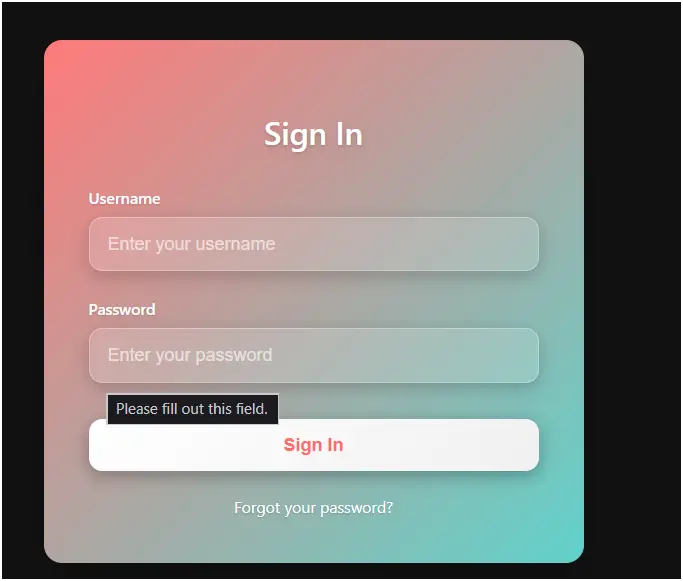
This code creates a modern Gradient Card Login Form designed for a sleek, dark-themed interface. It features a gradient-colored card, soft shadows, and interactive input fields, providing a visually appealing login experience. The form is fully responsive and works on desktop and mobile devices.
Features
- Gradient Card Design
- The login card uses a linear gradient background (
#ff6b6bto#4ecdc4) for a vibrant look. - Rounded corners and shadows enhance the 3D effect.
- The login card uses a linear gradient background (
- Interactive Input Fields
- Inputs have soft backgrounds and subtle shadows.
- On focus, the border color changes, background becomes slightly lighter, and a glow effect is applied.
- Placeholders are semi-transparent for readability.
- Login Button Effects
- Button uses a light gradient for contrast with the card background.
- Hover and active effects include shadow intensification and slight movement (translateY).
- Error Handling
- An error message appears below the button if login credentials are incorrect.
- The error box is styled with semi-transparent red, rounded corners, and subtle shadows.
- Forgot Password Link
- Styled link appears below the form.
- On hover, the color changes to match the gradient for emphasis.
- Responsive Design
- Card width and padding adjust for screens smaller than 480px.
- Maintains usability on mobile devices.
- JavaScript Validation
- Simple demo validation checks if
username === "admin"andpassword === "password123". - Shows a success alert for correct credentials or displays the error message for incorrect inputs.
- Supports pressing Enter to submit while focusing on any input field.
- Simple demo validation checks if
How It Works
- HTML Structure
- The
.login-carddiv contains the heading, form, and forgot password link. - Form has two input fields (username and password) and a submit button.
- An error message
<div>is hidden initially.
- The
- CSS Styling
- Gradient background and shadows create depth.
- Inputs and buttons have transitions for smooth focus/hover effects.
- Media queries ensure responsiveness.
- JavaScript Functionality
handleLogin()validates credentials.- Displays error message if login fails.
- Listens for Enter key to trigger the login.
Conclusion
The Gradient Card Login Form is a modern, professional login interface with a focus on visual appeal, responsiveness, and basic validation. Its gradient design and interactive elements make it suitable for modern web applications or dashboards.
<!DOCTYPE html> <html lang="en"> <head> <meta charset="UTF-8"> <meta name="viewport" content="width=device-width, initial-scale=1.0"> <title>Gradient Card Login Form</title> <style> body { font-family: 'Segoe UI', Tahoma, Geneva, Verdana, sans-serif; display: flex; justify-content: center; align-items: center; min-height: 100vh; margin: 0; background: #121212; padding: 20px; box-sizing: border-box; } .login-card { background: linear-gradient(135deg, #ff6b6b 0%, #4ecdc4 100%); border-radius: 16px; box-shadow: 0 15px 35px rgba(0, 0, 0, 0.3); padding: 40px; width: 100%; max-width: 400px; position: relative; overflow: hidden; } .login-card::before { content: ''; position: absolute; top: 0; left: 0; right: 0; bottom: 0; background: rgba(255, 255, 255, 0.1); z-index: 0; border-radius: 16px; } .login-card h2 { text-align: center; margin-bottom: 30px; color: #fff; font-size: 28px; font-weight: 600; text-shadow: 0 2px 4px rgba(0, 0, 0, 0.2); position: relative; z-index: 1; } .form-group { margin-bottom: 24px; position: relative; z-index: 1; } .form-group label { display: block; margin-bottom: 8px; color: #fff; font-weight: 500; font-size: 14px; text-shadow: 0 1px 2px rgba(0, 0, 0, 0.2); } .form-group input { width: 100%; padding: 14px 16px; border: 1px solid rgba(255, 255, 255, 0.3); border-radius: 12px; font-size: 16px; background: rgba(255, 255, 255, 0.15); color: #fff; transition: all 0.3s ease; box-sizing: border-box; box-shadow: 0 4px 15px rgba(0, 0, 0, 0.2); } .form-group input:focus { outline: none; border-color: #fff; background: rgba(255, 255, 255, 0.25); box-shadow: 0 0 15px rgba(255, 255, 255, 0.3); } .form-group input::placeholder { color: rgba(255, 255, 255, 0.6); } .login-button { width: 100%; padding: 14px; background: linear-gradient(135deg, #fff 0%, #f0f0f0 100%); color: #ff6b6b; border: none; border-radius: 12px; font-size: 16px; font-weight: 600; cursor: pointer; transition: all 0.3s ease; box-shadow: 0 4px 15px rgba(0, 0, 0, 0.3); margin-top: 8px; position: relative; z-index: 1; } .login-button:hover { transform: translateY(-2px); box-shadow: 0 10px 25px rgba(0, 0, 0, 0.4); background: linear-gradient(135deg, #f0f0f0 0%, #fff 100%); } .login-button:active { transform: translateY(0); box-shadow: 0 4px 15px rgba(0, 0, 0, 0.2); } .error { color: #ff4d4d; font-size: 14px; text-align: center; margin-top: 16px; display: none; padding: 10px; background: rgba(255, 77, 77, 0.2); border-radius: 8px; border: 1px solid rgba(255, 77, 77, 0.3); box-shadow: 0 4px 15px rgba(0, 0, 0, 0.2); position: relative; z-index: 1; } .forgot-password { text-align: center; margin-top: 20px; position: relative; z-index: 1; } .forgot-password a { color: #fff; text-decoration: none; font-size: 14px; transition: color 0.3s ease; text-shadow: 0 1px 2px rgba(0, 0, 0, 0.2); } .forgot-password a:hover { color: #ff6b6b; text-decoration: underline; } @media (max-width: 480px) { .login-card { padding: 30px 24px; margin: 10px; } } </style> </head> <body> <div class="login-card"> <h2>Sign In</h2> <form id="loginForm"> <div class="form-group"> <label for="username">Username</label> <input type="text" id="username" placeholder="Enter your username" required> </div> <div class="form-group"> <label for="password">Password</label> <input type="password" id="password" placeholder="Enter your password" required> </div> <button type="submit" class="login-button">Sign In</button> <div class="error" id="error-message">Invalid username or password. Please try again.</div> </form> <div class="forgot-password"> <a href="#">Forgot your password?</a> </div> </div> <script> document.getElementById('loginForm').addEventListener('submit', function(e) { e.preventDefault(); handleLogin(); }); function handleLogin() { const username = document.getElementById('username').value.trim(); const password = document.getElementById('password').value; const errorMessage = document.getElementById('error-message'); // Simple demo validation if (username === "admin" && password === "password123") { alert("Login successful! Welcome to the dashboard."); errorMessage.style.display = 'none'; } else { errorMessage.style.display = 'block'; document.getElementById('password').focus(); } } // Add enter key support document.addEventListener('keypress', function(e) { if (e.key === 'Enter') { const activeElement = document.activeElement; if (activeElement.tagName === 'INPUT') { handleLogin(); } } }); </script> </body> </html>