Introduction
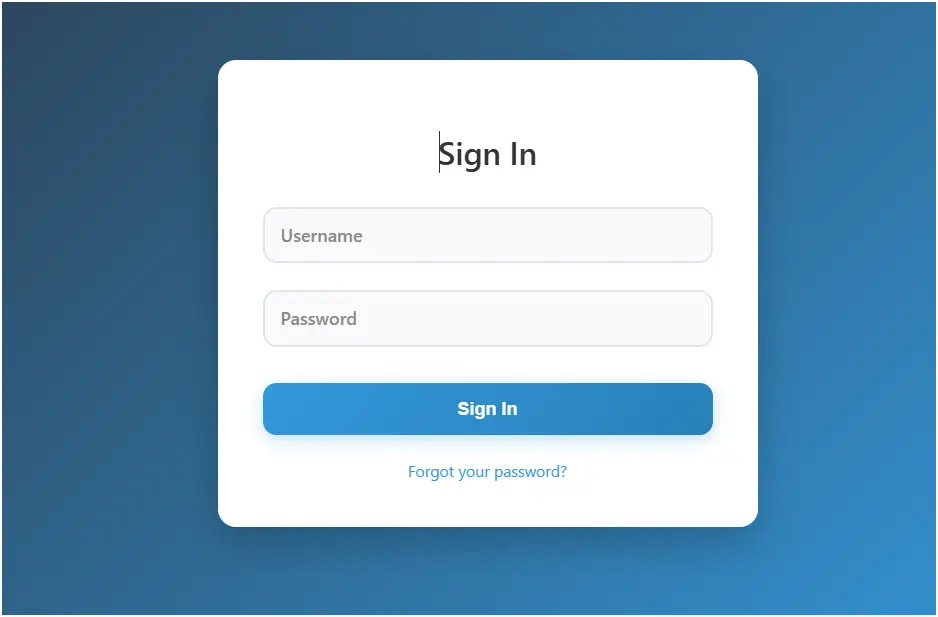
This code creates a modern animated login form where the card slides in when the page loads and input placeholders animate when focused. The design is visually appealing with subtle animations, making the login experience dynamic and professional.
Features
- Slide-In Animation on Load
- The
.login-carduses theslideInkeyframe to slide up from below while fading in (opacity: 0 → 1). - Gives a smooth entry effect for the login form.
- The
- Animated Floating Labels
- Input placeholders are hidden, and labels float above when the user focuses on the input or types something.
- Achieved using CSS transitions on
top,left,font-size, andcolor.
- Interactive Login Button
- Gradient button with hover effects:
- Moves slightly upward (
translateY(-2px)) - Adds a subtle shadow
- Shiny gradient animation using
::beforepseudo-element sliding across the button
- Moves slightly upward (
- Gradient button with hover effects:
- Error Feedback
- Invalid login triggers a red error box with a shake animation (
shakekeyframe). - Immediate visual feedback enhances UX.
- Invalid login triggers a red error box with a shake animation (
- Forgot Password Link
- Simple link below the form with hover effect changing color.
- Responsive Design
- Adjusts padding and margin for smaller screens (
max-width: 480px) - Ensures usability on mobile devices.
- Adjusts padding and margin for smaller screens (
- JavaScript Functionality
handleLogin()validates credentials (username === "admin"andpassword === "password123").- Shows success alert or displays error box.
- Pressing Enter while on an input triggers the login function.
How It Works
- HTML Structure
.login-cardcontains the heading, form, inputs, button, and forgot password link.- Labels act as floating placeholders.
- CSS Styling
- Background gradient for the page.
- Card with box-shadow for depth.
- Animated transitions for labels, button hover, and card slide-in.
- Error message shakes when triggered.
- JavaScript
- Simple demo validation for login.
- Shows error if credentials are wrong.
- Supports Enter key submission.
Conclusion
This Animated Card Login Form combines modern design, interactive UI, and smooth animations for a professional login experience. It’s mobile-friendly, visually dynamic, and user-focused.
<!DOCTYPE html>
<html lang="en">
<head>
<meta charset="UTF-8">
<meta name="viewport" content="width=device-width, initial-scale=1.0">
<title>Animated Card Login Form</title>
<style>
body {
font-family: 'Segoe UI', Tahoma, Geneva, Verdana, sans-serif;
display: flex;
justify-content: center;
align-items: center;
min-height: 100vh;
margin: 0;
background: linear-gradient(135deg, #2c3e50 0%, #3498db 100%);
padding: 20px;
box-sizing: border-box;
}
.login-card {
background: #ffffff;
border-radius: 16px;
box-shadow: 0 15px 35px rgba(0, 0, 0, 0.2);
padding: 40px;
width: 100%;
max-width: 400px;
position: relative;
animation: slideIn 0.6s ease-out forwards;
opacity: 0;
transform: translateY(50px);
}
@keyframes slideIn {
from {
opacity: 0;
transform: translateY(50px);
}
to {
opacity: 1;
transform: translateY(0);
}
}
.login-card h2 {
text-align: center;
margin-bottom: 30px;
color: #333;
font-size: 28px;
font-weight: 600;
animation: fadeIn 0.8s ease-out forwards;
}
@keyframes fadeIn {
from { opacity: 0; }
to { opacity: 1; }
}
.form-group {
margin-bottom: 24px;
position: relative;
}
.form-group label {
display: block;
margin-bottom: 8px;
color: #555;
font-weight: 500;
font-size: 14px;
transition: color 0.3s ease;
}
.form-group input {
width: 100%;
padding: 14px 16px;
border: 2px solid #e1e5e9;
border-radius: 12px;
font-size: 16px;
background: #f8f9fa;
color: #333;
transition: all 0.3s ease;
box-sizing: border-box;
position: relative;
}
.form-group input:focus {
outline: none;
border-color: #3498db;
background: #fff;
box-shadow: 0 0 0 3px rgba(52, 152, 219, 0.2);
}
.form-group input::placeholder {
color: transparent;
}
.form-group label.placeholder {
position: absolute;
top: 14px;
left: 16px;
color: #888;
font-size: 16px;
pointer-events: none;
transition: all 0.3s ease;
}
.form-group input:focus + label.placeholder,
.form-group input:not(:placeholder-shown) + label.placeholder {
top: -20px;
left: 12px;
font-size: 12px;
color: #3498db;
font-weight: 500;
}
.login-button {
width: 100%;
padding: 14px;
background: linear-gradient(135deg, #3498db 0%, #2980b9 100%);
color: #fff;
border: none;
border-radius: 12px;
font-size: 16px;
font-weight: 600;
cursor: pointer;
transition: all 0.3s ease;
box-shadow: 0 4px 15px rgba(52, 152, 219, 0.3);
margin-top: 8px;
position: relative;
overflow: hidden;
}
.login-button::before {
content: '';
position: absolute;
top: 0;
left: -100%;
width: 100%;
height: 100%;
background: linear-gradient(90deg, transparent, rgba(255, 255, 255, 0.3), transparent);
transition: left 0.5s ease;
}
.login-button:hover::before {
left: 100%;
}
.login-button:hover {
transform: translateY(-2px);
box-shadow: 0 10px 25px rgba(52, 152, 219, 0.4);
background: linear-gradient(135deg, #3bace2 0%, #3498db 100%);
}
.login-button:active {
transform: translateY(0);
box-shadow: 0 4px 15px rgba(52, 152, 219, 0.2);
}
.error {
color: #e74c3c;
font-size: 14px;
text-align: center;
margin-top: 16px;
display: none;
padding: 10px;
background: #ffebee;
border-radius: 8px;
border: 1px solid #e74c3c;
animation: shake 0.4s ease;
}
@keyframes shake {
0%, 100% { transform: translateX(0); }
25% { transform: translateX(-5px); }
75% { transform: translateX(5px); }
}
.forgot-password {
text-align: center;
margin-top: 20px;
}
.forgot-password a {
color: #3498db;
text-decoration: none;
font-size: 14px;
transition: color 0.3s ease;
}
.forgot-password a:hover {
color: #2980b9;
text-decoration: underline;
}
@media (max-width: 480px) {
.login-card {
padding: 30px 24px;
margin: 10px;
}
}
</style>
</head>
<body>
<div class="login-card">
<h2>Sign In</h2>
<form id="loginForm">
<div class="form-group">
<input type="text" id="username" placeholder=" " required>
<label class="placeholder" for="username">Username</label>
</div>
<div class="form-group">
<input type="password" id="password" placeholder=" " required>
<label class="placeholder" for="password">Password</label>
</div>
<button type="submit" class="login-button">Sign In</button>
<div class="error" id="error-message">Invalid username or password. Please try again.</div>
</form>
<div class="forgot-password">
<a href="#">Forgot your password?</a>
</div>
</div>
<script>
document.getElementById('loginForm').addEventListener('submit', function(e) {
e.preventDefault();
handleLogin();
});
function handleLogin() {
const username = document.getElementById('username').value.trim();
const password = document.getElementById('password').value;
const errorMessage = document.getElementById('error-message');
// Simple demo validation
if (username === "admin" && password === "password123") {
alert("Login successful! Welcome to the dashboard.");
errorMessage.style.display = 'none';
} else {
errorMessage.style.display = 'block';
document.getElementById('password').focus();
}
}
// Add enter key support
document.addEventListener('keypress', function(e) {
if (e.key === 'Enter') {
const activeElement = document.activeElement;
if (activeElement.tagName === 'INPUT') {
handleLogin();
}
}
});
</script>
</body>
</html>