Introduction
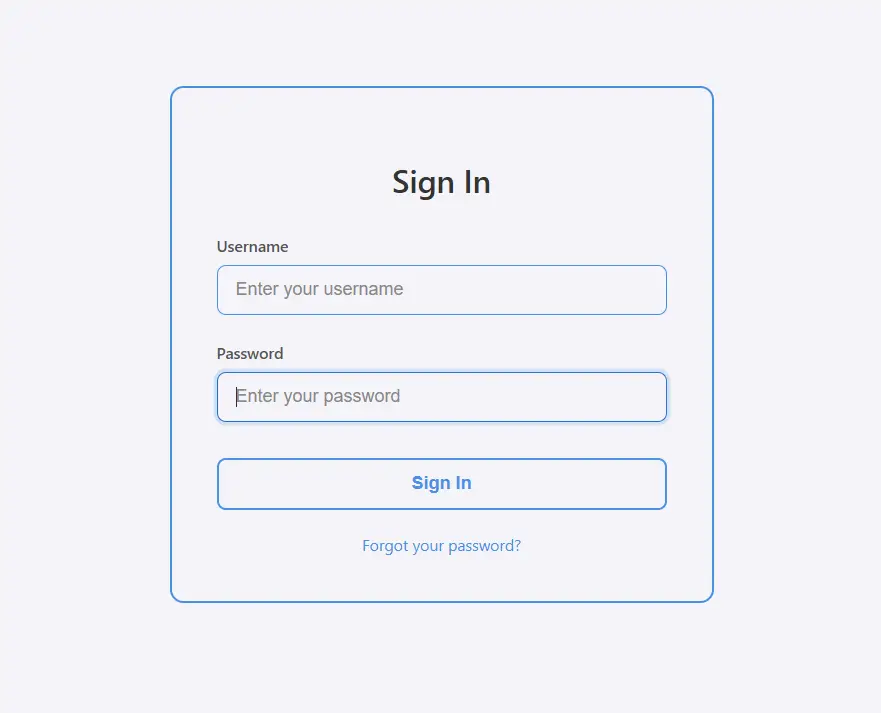
This code creates a clean and minimalistic login form with an outlined card style. The form has a transparent background with subtle borders and focuses on simplicity, making it suitable for professional or corporate websites.
Features
- Outlined Card Design
- The
.login-carduses a 2px border instead of a filled background. - Minimal shadow (none in this case) keeps the design light and simple.
- The
- Clean Typography
- Headings and labels use a neutral color palette (
#333for headings,#555for labels). - Font-weight and size provide readability without overpowering the layout.
- Headings and labels use a neutral color palette (
- Interactive Input Fields
- Transparent inputs with a border outline.
- On focus, the border color changes and a subtle shadow appears (
box-shadow: 0 0 0 3px rgba(74, 144, 226, 0.2)). - Placeholders are visible but do not distract from the label.
- Outlined Button with Hover Effect
- Button uses transparent background with a border matching the card (
#4a90e2). - On hover, it fills with color and text becomes white, providing a clear interaction cue.
- Button uses transparent background with a border matching the card (
- Error Feedback
- When login fails, a red error box appears with text alerting the user.
- Background is transparent to match the card style but still visually distinguishable.
- Forgot Password Link
- Subtle link below the form with hover effect changing the color, keeping focus on the form.
- Responsive Design
- Adjusts padding and margins on screens smaller than 480px for mobile usability.
- JavaScript Validation
- Simple client-side validation for demo purposes.
- Shows an alert on success (
admin / password123) and displays error message on failure. - Supports Enter key submission while focusing on input fields.
How It Works
- HTML Structure
.login-cardcontains heading, form, inputs, button, error message, and forgot password link.- Labels guide the user, and placeholders provide additional hints.
- CSS Styling
- Uses borders instead of filled backgrounds for the card and inputs.
- Hover and focus effects provide subtle interactive feedback.
- Button hover effect is clear but minimal, keeping the outlined aesthetic.
- JavaScript Functionality
- Prevents default form submission.
- Checks credentials and shows feedback accordingly.
- Supports pressing Enter to trigger login.
Conclusion
The Outlined Card Login Form emphasizes simplicity, clarity, and usability. Its clean design, subtle interactions, and responsive layout make it perfect for professional websites or apps that want a minimalist login interface.
<!DOCTYPE html>
<html lang="en">
<head>
<meta charset="UTF-8">
<meta name="viewport" content="width=device-width, initial-scale=1.0">
<title>Outlined Card Login Form</title>
<style>
body {
font-family: 'Segoe UI', Tahoma, Geneva, Verdana, sans-serif;
display: flex;
justify-content: center;
align-items: center;
min-height: 100vh;
margin: 0;
background: #f4f4f9;
padding: 20px;
box-sizing: border-box;
}
.login-card {
border: 2px solid #4a90e2;
border-radius: 12px;
background: transparent;
padding: 40px;
width: 100%;
max-width: 400px;
box-shadow: none;
position: relative;
}
.login-card h2 {
text-align: center;
margin-bottom: 30px;
color: #333;
font-size: 28px;
font-weight: 600;
}
.form-group {
margin-bottom: 24px;
position: relative;
}
.form-group label {
display: block;
margin-bottom: 8px;
color: #555;
font-weight: 500;
font-size: 14px;
}
.form-group input {
width: 100%;
padding: 12px 16px;
border: 1px solid #4a90e2;
border-radius: 8px;
font-size: 16px;
background: transparent;
color: #333;
transition: all 0.3s ease;
box-sizing: border-box;
}
.form-group input:focus {
outline: none;
border-color: #2a6fc9;
box-shadow: 0 0 0 3px rgba(74, 144, 226, 0.2);
}
.form-group input::placeholder {
color: #888;
}
.login-button {
width: 100%;
padding: 12px;
background: transparent;
border: 2px solid #4a90e2;
border-radius: 8px;
font-size: 16px;
font-weight: 600;
color: #4a90e2;
cursor: pointer;
transition: all 0.3s ease;
margin-top: 8px;
}
.login-button:hover {
background: #4a90e2;
color: #fff;
transform: translateY(-2px);
}
.login-button:active {
transform: translateY(0);
}
.error {
color: #e74c3c;
font-size: 14px;
text-align: center;
margin-top: 16px;
display: none;
padding: 10px;
border: 1px solid #e74c3c;
border-radius: 8px;
background: transparent;
}
.forgot-password {
text-align: center;
margin-top: 20px;
}
.forgot-password a {
color: #4a90e2;
text-decoration: none;
font-size: 14px;
transition: color 0.3s ease;
}
.forgot-password a:hover {
color: #2a6fc9;
text-decoration: underline;
}
@media (max-width: 480px) {
.login-card {
padding: 30px 24px;
margin: 10px;
}
}
</style>
</head>
<body>
<div class="login-card">
<h2>Sign In</h2>
<form id="loginForm">
<div class="form-group">
<label for="username">Username</label>
<input type="text" id="username" placeholder="Enter your username" required>
</div>
<div class="form-group">
<label for="password">Password</label>
<input type="password" id="password" placeholder="Enter your password" required>
</div>
<button type="submit" class="login-button">Sign In</button>
<div class="error" id="error-message">Invalid username or password. Please try again.</div>
</form>
<div class="forgot-password">
<a href="#">Forgot your password?</a>
</div>
</div>
<script>
document.getElementById('loginForm').addEventListener('submit', function(e) {
e.preventDefault();
handleLogin();
});
function handleLogin() {
const username = document.getElementById('username').value.trim();
const password = document.getElementById('password').value;
const errorMessage = document.getElementById('error-message');
// Simple demo validation
if (username === "admin" && password === "password123") {
alert("Login successful! Welcome to the dashboard.");
errorMessage.style.display = 'none';
} else {
errorMessage.style.display = 'block';
document.getElementById('password').focus();
}
}
// Add enter key support
document.addEventListener('keypress', function(e) {
if (e.key === 'Enter') {
const activeElement = document.activeElement;
if (activeElement.tagName === 'INPUT') {
handleLogin();
}
}
});
</script>
</body>
</html>