Introduction
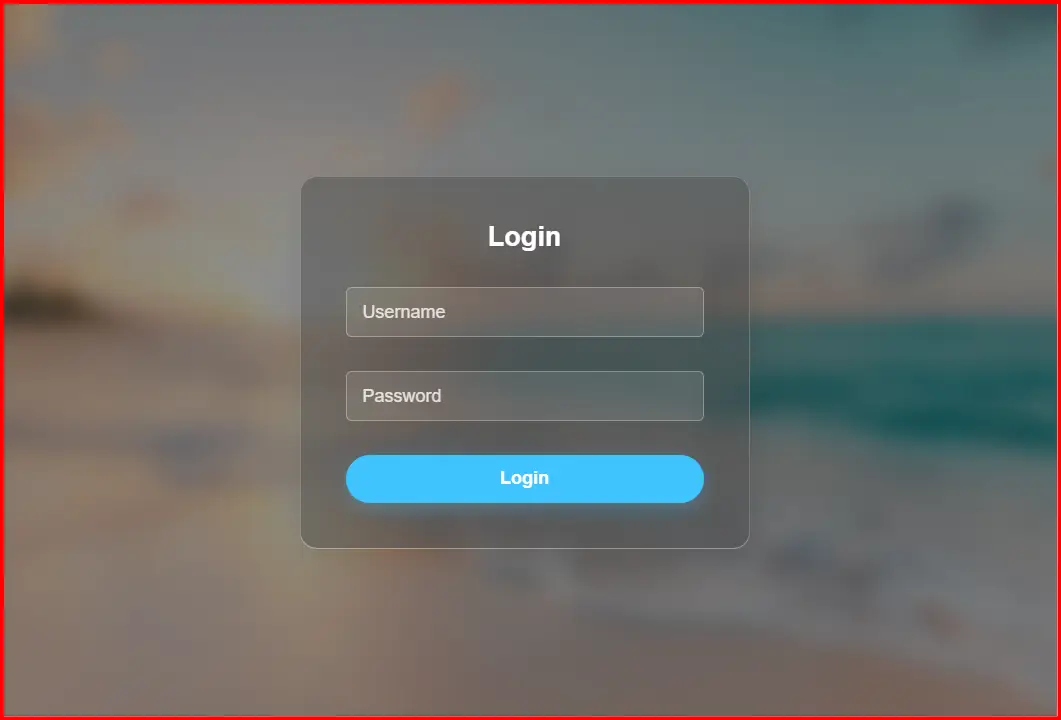
This code defines a Light Glass Full-Screen Overlay Login Form using HTML, CSS, and JavaScript.
It provides a bright and elegant login interface with a soft blur effect, light tones, and smooth animations.
The form uses the glassmorphism design principle, blending transparency and depth to create a modern, user-friendly login experience suitable for websites, admin panels, and online systems.
Code Explanation
1. HTML Structure
The HTML defines the layout and structure of the login form.
- The
<div class="overlay">creates a semi-transparent layer that covers the entire viewport and holds the login form in the center. - Inside it, the
<div class="login-container">serves as the main form box, including the heading, input fields, and login button. - Two
<div class="input-group">elements hold the input fields for the username and password, each with floating labels for a cleaner appearance. - A
<button>is used to trigger the login function. - The
<div class="error-message">displays an error message when the user leaves fields empty or enters invalid credentials.
2. CSS Styling
The CSS portion gives the login form its visual presentation and responsiveness.
a. Background and Layout
- The body uses a full-screen background image with
background: url(...) no-repeat center center/cover;to create a dynamic backdrop. - The
.overlayclass applies a semi-transparent black layer and a blur filter usingbackdrop-filter: blur(10px)to achieve the glass effect. - The form is centered both vertically and horizontally using
flexbox.
b. Glassmorphism Effect
- The
.login-containerfeatures a translucent white background (rgba(255, 255, 255, 0.15)) combined with a border and shadow to create the glass appearance. - A subtle white border and
box-shadoware used to provide depth and separation from the background.
c. Input Fields
- Each input field has a slightly transparent background and rounded corners.
- When focused, inputs glow with a light blue (#40c4ff) outline and a soft shadow.
- Floating labels rise above the input when the user starts typing or focuses on the field, turning blue for clarity.
d. Button Styling
- The login button is styled with a light blue theme and rounded edges.
- On hover, it darkens to a deeper blue (
#0288d1) and adds a glowing shadow, enhancing interactivity.
e. Error Message
- The
.error-messageclass defines red text that appears only when needed, with a subtle shadow for better visibility against light backgrounds.
3. JavaScript Functionality
The JavaScript adds interactivity and basic validation to the form.
- The
handleLogin()function captures the values entered in the username and password fields. - If any field is empty, it displays the error message by setting its
displayproperty toblock. - If both fields are filled, it hides the error message and simulates a login success using an alert.
(This section can be connected to real authentication systems like Firebase, PHP, or Node.js.) - Additionally, a keydown event listener allows users to press the Enter key to log in, improving accessibility and ease of use.
Main Features
- Light Glass Design:
Uses transparency and blur for a modern, elegant glassmorphism effect. - Full-Screen Overlay:
The form appears as a centered modal over the entire background image. - Responsive Layout:
Automatically adjusts to different screen sizes including desktops, tablets, and smartphones. - Floating Labels:
Labels move upward when the input is active, maintaining clarity and saving space. - Animated Focus Effects:
Inputs and buttons change color and glow when interacted with, improving user engagement. - Keyboard Login Support:
Users can press Enter to log in, without manually clicking the button. - Error Handling:
Displays an appropriate message when fields are incomplete or empty. - Smooth Transitions:
All visual changes have smooth transitions for a polished user experience. - Customizable Appearance:
Colors, fonts, and background images can easily be changed to match any website’s design. - Simple and Extendable Codebase:
The structure allows easy integration with backend systems or additional features like "Forgot Password" or "Sign Up."
Best Way to Use This Code
- For Professional Websites:
Use it as a login interface for admin panels, member dashboards, or portfolio websites. - Backend Integration:
Replace the simulated alert with a real authentication process connected to a server, database, or third-party API. - Customization Options:
- Change background images for different moods or brand identity.
- Adjust transparency levels and color accents.
- Modify button colors to fit your brand’s color palette.
- Add Extra Functionality:
Include options like password visibility toggle, “Remember Me” checkbox, or sign-up links. - Performance Optimization:
Use optimized background images and ensure HTTPS for secure data handling. - Accessibility Enhancement:
Add properaria-labelsand increase contrast for better readability.
Conclusion
The Full Screen Overlay Login Form - Light Glass provides a sophisticated and modern approach to user authentication interfaces.
Its clean, translucent design creates a soft and professional visual effect suitable for any type of digital platform.
By combining light transparency, blur effects, and interactive feedback, this login form enhances both usability and aesthetics.
With minimal customization and real authentication integration, it can serve as an elegant front-end login page for modern web applications and online systems.
<!DOCTYPE html>
<html lang="en">
<head>
<meta charset="UTF-8">
<meta name="viewport" content="width=device-width, initial-scale=1.0">
<title>Full Screen Overlay Login Form - Light Glass</title>
<style>
* {
margin: 0;
padding: 0;
box-sizing: border-box;
font-family: Arial, sans-serif;
}
body {
min-height: 100vh;
display: flex;
justify-content: center;
align-items: center;
background: url('https://images.unsplash.com/photo-1507525428034-b723cf961d3e') no-repeat center center/cover;
}
.overlay {
position: fixed;
top: 0;
left: 0;
width: 100%;
height: 100%;
background: rgba(0, 0, 0, 0.4);
backdrop-filter: blur(10px);
display: flex;
justify-content: center;
align-items: center;
z-index: 1000;
}
.login-container {
background: rgba(255, 255, 255, 0.15);
padding: 40px;
border-radius: 15px;
box-shadow: 0 8px 32px rgba(0, 0, 0, 0.1);
backdrop-filter: blur(10px);
border: 1px solid rgba(255, 255, 255, 0.2);
width: 100%;
max-width: 400px;
text-align: center;
}
.login-container h2 {
color: #fff;
margin-bottom: 30px;
font-size: 24px;
text-shadow: 0 2px 4px rgba(0, 0, 0, 0.1);
}
.input-group {
position: relative;
margin-bottom: 30px;
}
.input-group input {
width: 100%;
padding: 12px 15px;
background: rgba(255, 255, 255, 0.1);
border: 1px solid rgba(255, 255, 255, 0.3);
border-radius: 5px;
color: #fff;
font-size: 16px;
outline: none;
transition: all 0.3s ease;
}
.input-group input:focus {
border-color: #40c4ff;
box-shadow: 0 0 10px rgba(64, 196, 255, 0.5);
background: rgba(255, 255, 255, 0.2);
}
.input-group label {
position: absolute;
top: 50%;
left: 15px;
transform: translateY(-50%);
color: rgba(255, 255, 255, 0.8);
pointer-events: none;
transition: all 0.3s ease;
}
.input-group input:focus + label,
.input-group input:not(:placeholder-shown) + label {
top: -10px;
font-size: 12px;
color: #40c4ff;
background: transparent;
}
button {
width: 100%;
padding: 12px;
background: #40c4ff;
border: none;
border-radius: 25px;
color: #fff;
font-size: 16px;
font-weight: bold;
cursor: pointer;
transition: all 0.3s ease;
box-shadow: 0 4px 15px rgba(64, 196, 255, 0.3);
}
button:hover {
background: #0288d1;
box-shadow: 0 6px 20px rgba(64, 196, 255, 0.5);
}
.error-message {
color: #ff5252;
margin-top: 10px;
display: none;
text-shadow: 0 1px 2px rgba(0, 0, 0, 0.1);
}
</style>
</head>
<body>
<div class="overlay">
<div class="login-container">
<h2>Login</h2>
<div class="input-group">
<input type="text" id="username" placeholder=" " required>
<label for="username">Username</label>
</div>
<div class="input-group">
<input type="password" id="password" placeholder=" " required>
<label for="password">Password</label>
</div>
<button onclick="handleLogin()">Login</button>
<div class="error-message" id="error-message">Invalid username or password</div>
</div>
</div>
<script>
function handleLogin() {
const username = document.getElementById('username').value;
const password = document.getElementById('password').value;
const errorMessage = document.getElementById('error-message');
if (username === '' || password === '') {
errorMessage.style.display = 'block';
} else {
errorMessage.style.display = 'none';
// Simulate login (replace with actual authentication logic)
alert('Login successful! Username: ' + username);
}
}
// Allow login with Enter key
document.addEventListener('keydown', (event) => {
if (event.key === 'Enter') {
handleLogin();
}
});
</script>
</body>
</html>
HTML Login & Registration Forms – Parking / Management Systems & Modern UI Designs (Related to HTML Forms)
Login & Register Form for Park Management System with Dropdown:
This type of HTML form combines login and registration functionality for parking or park management systems. It often uses dropdown menus to switch between login and sign-up options in a single interface, making it more user-friendly and compact for web applications.
Read more: https://macronepal.com/blog/login-and-register-form-for-park-managmet-system-with-dropdown/
Dropdown Login Form for Parking System:
A dropdown login form allows users to select options like user type (admin/user) before logging in. This improves system control and is commonly used in parking management systems to separate different access levels.
Read more: https://macronepal.com/blog/drop-down-login-form-for-parking-system/
Dropdown Login Form for Park Management System:
Similar to parking systems, this login design uses dropdown selection to manage different roles such as staff, admin, or users. It simplifies authentication while improving system organization.
Read more: https://macronepal.com/blog/drop-down-login-form-for-park-managment-system/
Simple Login Form for Park Management System:
A basic login form built using HTML that includes fields like username and password. It is used for secure access to park management dashboards and is easy to design and implement.
Read more: https://macronepal.com/blog/simple-login-form-code-for-park-managment-system/
AI Style Glow Fullscreen Overlay Login Form:
This modern login form uses glowing UI effects and full-screen overlays to create an advanced and attractive design. It enhances user experience using CSS animations and visual effects.
Read more: https://macronepal.com/blog/ai-style-glow-fullscreen-overlay-login-form/
Glassmorphism Login Form:
Glassmorphism is a modern UI design style that uses blur, transparency, and frosted glass effects. It makes login forms look stylish and professional while maintaining readability.
Read more: https://macronepal.com/blog/what-is-glassmorphism-login-form/
Emoji Background Overlay Full Screen Login Form:
This login design uses emoji-based backgrounds with full-screen overlay effects to create a fun and engaging user interface while keeping login functionality simple.
Read more: https://macronepal.com/blog/emoji-background-overlay-full-screen-login-form/
Minimal Center Alignment Fullscreen Overlay Login Form:
A clean and minimal login form centered on the screen. It focuses on simplicity, proper alignment, and distraction-free user experience.
Read more: https://macronepal.com/blog/minimal-center-alignment-fullscreen-overlay-login-form/
Image Blur Focus Fullscreen Overlay Login Form:
This login design uses blurred background images with a focused login box in the center, improving visual depth and user attention on the form.
Read more: https://macronepal.com/blog/image-blur-focus-fullscreen-overlay-login-form/
Geometric Pattern Fullscreen Overlay Login Form:
A creative login form design that uses geometric patterns as backgrounds with overlay effects, giving a modern and structured visual appearance.
Read more: https://macronepal.com/blog/geometric-pattern-fullscreen-overlay-login-form/