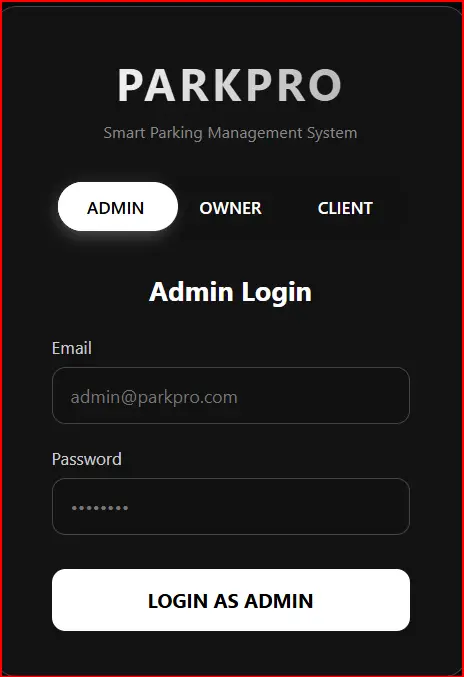
Features Included:
- Black & White Premium Design with smooth animations
- 3-Way Toggle Switch (Admin / Owner / Client)
- Admin Login Only (with demo: [email protected] / Admin@123)
- Owner & Client Registration with full fields
- Strong Password Validation:
- 8+ characters
- 1 uppercase, 1 lowercase
- 1 number, 1 symbol
- Email validation with @
- Nepali phone format support (+977)
- Real-time error/success messages
- Fully responsive
- Single HTML file – just save and open!
Copy this entire code into a file named parking-login.html and open in any browser.
<!DOCTYPE html> <html lang="en"> <head> <meta charset="UTF-8"> <meta name="viewport" content="width=device-width, initial-scale=1.0"> <title>Parking System - Login & Register</title> <style> :root { --bg: #000; --text: #fff; --accent: #fff; --input-bg: #111; --border: #444; --error: #ff3333; --success: #00ff00; } * { margin: 0; padding: 0; box-sizing: border-box; font-family: 'Segoe UI', sans-serif; } body { background: var(--bg); color: var(--text); min-height: 100vh; display: flex; align-items: center; justify-content: center; padding: 20px; } .container { background: rgba(20, 20, 20, 0.95); padding: 40px 50px; border-radius: 20px; box-shadow: 0 0 40px rgba(255, 255, 255, 0.1); width: 100%; max-width: 420px; border: 1px solid var(--border); position: relative; overflow: hidden; } .logo { text-align: center; margin-bottom: 30px; } .logo h1 { font-size: 2.5rem; letter-spacing: 3px; background: linear-gradient(90deg, #fff, #aaa); -webkit-background-clip: text; -webkit-text-fill-color: transparent; } .logo p { color: #888; font-size: 0.9rem; margin-top: 8px; } .toggle-switch { display: flex; background: var(--input-bg); border-radius: 50px; padding: 6px; margin-bottom: 30px; position: relative; } .toggle-btn { flex: 1; padding48px; padding: 12px; text-align: center; cursor: pointer; border-radius: 50px; transition: all 0.4s ease; z-index: 2; font-weight: 600; font-size: 0.95rem; } .toggle-btn.active { background: #fff; color: #000; box-shadow: 0 4px 15px rgba(255, 255, 255, 0.3); } .slider { position: absolute; top: 6px; left: 6px; width: 33.33%; height: calc(100% - 12px); background: #fff; border-radius: 50px; transition: all 0.4s ease; box-shadow: 0 4px 20px rgba(0,0,0,0.4); } .form-container { position: relative; } .form-group { margin-bottom: 20px; position: relative; } label { display: block; margin-bottom: 8px; font-size: 0.95rem; color: #ccc; } input { width: 100%; padding: 14px 16px; background: var(--input-bg); border: 1px solid var(--border); border-radius: 12px; color: #fff; font-size: 1rem; transition: all 0.3s ease; } input:focus { outline: none; border-color: #fff; box-shadow: 0 0 0 3px rgba(255, 255, 255, 0.1); } .password-requirements { font-size: 0.8rem; color: #888; margin-top: 8px; line-height: 1.4; } .error { color: var(--error); font-size: 0.85rem; margin-top: 6px; display: none; } .success { color: var(--success); font-size: 0.85rem; margin-top: 6px; display: none; } button { width: 100%; padding: 16px; background: #fff; color: #000; border: none; border-radius: 12px; font-size: 1.1rem; font-weight: 700; cursor: pointer; transition: all 0.3s ease; margin-top: 10px; } button:hover { background: #eee; transform: translateY(-2px); } .switch-text { text-align: center; margin-top: 25px; color: #aaa; font-size: 0.9rem; } .switch-text a { color: #fff; text-decoration: none; font-weight: 600; } .switch-text a:hover { text-decoration: underline; } /* Form visibility */ .form-section { display: none; opacity: 0; transition: all 0.4s ease; } .form-section.active { display: block; opacity: 1; } @media (max-width: 480px) { .container { padding: 30px 25px; } .logo h1 { font-size: 2rem; } } </style> </head> <body> <div class="container"> <div class="logo"> <h1>PARKPRO</h1> <p>Smart Parking Management System</p> </div> <!-- Role Toggle Switch --> <div class="toggle-switch"> <div class="toggle-btn active" data-role="admin">ADMIN</div> <div class="toggle-btn" data-role="owner">OWNER</div> <div class="toggle-btn" data-role="client">CLIENT</div> <div class="slider"></div> </div> <div class="form-container"> <!-- Admin Login --> <div id="admin-form" class="form-section active"> <h2 style="text-align:center; margin-bottom:25px; color:#fff;">Admin Login</h2> <div class="form-group"> <label>Email</label> <input type="email" id="admin-email" placeholder="[email protected]" required> <div class="error" id="admin-email-error"></div> </div> <div class="form-group"> <label>Password</label> <input type="password" id="admin-password" placeholder="••••••••" required> <div class="error" id="admin-pass-error"></div> </div> <button onclick="adminLogin()">LOGIN AS ADMIN</button> <div class="success" id="admin-success"></div> </div> <!-- Owner Register/Login --> <div id="owner-form" class="form-section"> <h2 style="text-align:center; margin-bottom:25px; color:#fff;">Owner Portal</h2> <div class="form-group"> <label>Full Name</label> <input type="text" id="owner-name" placeholder="John Doe"> <div class="error" id="owner-name-error"></div> </div> <div class="form-group"> <label>Email</label> <input type="email" id="owner-email" placeholder="[email protected]"> <div class="error" id="owner-email-error"></div> </div> <div class="form-group"> <label>Password</label> <input type="password" id="owner-password" placeholder="••••••••"> <div class="error" id="owner-pass-error"></div> <div class="password-requirements"> Password must contain:<br> • At least 8 characters<br> • 1 uppercase, 1 lowercase<br> • 1 number & 1 symbol (!@#$%^&*) </div> </div> <div class="form-group"> <label>Parking Name</label> <input type="text" id="owner-parking" placeholder="Downtown Parking Lot"> <div class="error" id="owner-parking-error"></div> </div> <button onclick="ownerRegister()">REGISTER AS OWNER</button> <div class="switch-text"> Already have an account? <a href="#" onclick="switchToLogin('owner')">Login here</a> </div> <div class="success" id="owner-success"></div> </div> <!-- Client Register/Login --> <div id="client-form" class="form-section"> <h2 style="text-align:center; margin-bottom:25px; color:#fff;">Client Portal</h2> <div class="form-group"> <label>Full Name</label> <input type="text" id="client-name" placeholder="Jane Smith"> <div class="error" id="client-name-error"></div> </div> <div class="form-group"> <label>Email</label> <input type="email" id="client-email" placeholder="[email protected]"> <div class="error" id="client-email-error"></div> </div> <div class="form-group"> <label>Phone</label> <input type="tel" id="client-phone" placeholder="+977 98XXXXXXXX"> <div class="error" id="client-phone-error"></div> </div> <div class="form-group"> <label>Password</label> <input type="password" id="client-password" placeholder="••••••••"> <div class="error" id="client-pass-error"></div> <div class="password-requirements"> Password must contain:<br> • At least 8 characters<br> • 1 uppercase, 1 lowercase<br> • 1 number & 1 symbol (!@#$%^&*) </div> </div> <button onclick="clientRegister()">REGISTER AS CLIENT</button> <div class="switch-text"> Already registered? <a href="#" onclick="switchToLogin('client')">Login here</a> </div> <div class="success" id="client-success"></div> </div> </div> </div> <script> const slider = document.querySelector('.slider'); const toggleBtns = document.querySelectorAll('.toggle-btn'); const formSections = document.querySelectorAll('.form-section'); let currentRole = 'admin'; // Toggle between roles toggleBtns.forEach(btn => { btn.addEventListener('click', () => { const role = btn.getAttribute('data-role'); if (role === currentRole) return; // Update active button toggleBtns.forEach(b => b.classList.remove('active')); btn.classList.add('active'); // Move slider const index = ['admin', 'owner', 'client'].indexOf(role); slider.style.transform = `translateX(${index * 100}%)`; // Show correct form formSections.forEach(form => { form.classList.remove('active'); }); document.getElementById(`${role}-form`).classList.add('active'); currentRole = role; }); }); // Email validation function validateEmail(email) { const re = /^[^\s@]+@[^\s@]+\.[^\s@]+$/; return re.test(email); } // Password validation: 8+ chars, 1 upper, 1 lower, 1 number, 1 symbol function validatePassword(password) { const re = /^(?=.*[a-z])(?=.*[A-Z])(?=.*\d)(?=.*[!@#$%^&*])[A-Za-z\d!@#$%^&*]{8,}$/; return re.test(password); } // Clear all errors function clearErrors() { document.querySelectorAll('.error').forEach(e => e.style.display = 'none'); document.querySelectorAll('.success').forEach(s => s.style.display = 'none'); } // Admin Login function adminLogin() { clearErrors(); const email = document.getElementById('admin-email').value.trim(); const password = document.getElementById('admin-password').value; let valid = true; if (!email || !validateEmail(email)) { document.getElementById('admin-email-error').textContent = 'Valid email is required'; document.getElementById('admin-email-error').style.display = 'block'; valid = false; } if (!password || password.length < 6) { document.getElementById('admin-pass-error').textContent = 'Password must be at least 6 characters'; document.getElementById('admin-pass-error').style.display = 'block'; valid = false; } if (valid) { // Simulate admin check if (email === '[email protected]' && password === 'Admin@123') { document.getElementById('admin-success').textContent = 'Login successful! Redirecting to dashboard...'; document.getElementById('admin-success').style.display = 'block'; setTimeout(() => alert('Welcome Admin!'), 1000); } else { document.getElementById('admin-pass-error').textContent = 'Invalid credentials'; document.getElementById('admin-pass-error').style.display = 'block'; } } } // Owner Register function ownerRegister() { clearErrors(); const name = document.getElementById('owner-name').value.trim(); const email = document.getElementById('owner-email').value.trim(); const password = document.getElementById('owner-password').value; const parking = document.getElementById('owner-parking').value.trim(); let valid = true; if (!name || name.length < 3) { document.getElementById('owner-name-error').textContent = 'Name must be at least 3 characters'; document.getElementById('owner-name-error').style.display = 'block'; valid = false; } if (!email || !validateEmail(email)) { document.getElementById('owner-email-error').textContent = 'Valid email with @ required'; document.getElementById('owner-email-error').style.display = 'block'; valid = false; } if (!validatePassword(password)) { document.getElementById('owner-pass-error').textContent = 'Password must meet all requirements'; document.getElementById('owner-pass-error').style.display = 'block'; valid = false; } if (!parking || parking.length < 5) { document.getElementById('owner-parking-error').textContent = 'Enter valid parking name'; document.getElementById('owner-parking-error').style.display = 'block'; valid = false; } if (valid) { document.getElementById('owner-success').textContent = 'Owner registered successfully!'; document.getElementById('owner-success').style.display = 'block'; setTimeout(() => alert(`Welcome Owner: ${name}!`), 800); } } // Client Register function clientRegister() { clearErrors(); const name = document.getElementById('client-name').value.trim(); const email = document.getElementById('client-email').value.trim(); const phone = document.getElementById('client-phone').value.trim(); const password = document.getElementById('client-password').value; let valid = true; if (!name || name.length < 3) { document.getElementById('client-name-error').textContent = 'Name required'; document.getElementById('client-name-error').style.display = 'block'; valid = false; } if (!email || !validateEmail(email)) { document.getElementById('client-email-error').textContent = 'Valid email required'; document.getElementById('client-email-error').style.display = 'block'; valid = false; } if (!phone || !/^\+977\s[0-9]{10}$/.test(phone.replace(/-/g,' '))) { document.getElementById('client-phone-error').textContent = 'Valid Nepali number (+977 98XXXXXXXX)'; document.getElementById('client-phone-error').style.display = 'block'; valid = false; } if (!validatePassword(password)) { document.getElementById('client-pass-error').textContent = 'Password too weak'; document.getElementById('client-pass-error').style.display = 'block'; valid = false; } if (valid) { document.getElementById('client-success').textContent = 'Client account created!'; document.getElementById('client-success').style.display = 'block'; setTimeout(() => alert(`Welcome ${name}! Book your parking now!`), 800); } } // Switch to login (for future expansion) function switchToLogin(role) { alert(`Login for ${role} coming soon!`); } // Allow Enter key to submit document.addEventListener('keypress', function(e) { if (e.key === 'Enter') { if (currentRole === 'admin') adminLogin(); else if (currentRole === 'owner') ownerRegister(); else if (currentRole === 'client') clientRegister(); } }); </script> </body> </html> HTML Login & Registration Forms – Parking / Management Systems & Modern UI Designs (Related to HTML Forms)
Login & Register Form for Park Management System with Dropdown:
This type of HTML form combines login and registration functionality for parking or park management systems. It often uses dropdown menus to switch between login and sign-up options in a single interface, making it more user-friendly and compact for web applications.
Read more: https://macronepal.com/blog/login-and-register-form-for-park-managmet-system-with-dropdown/
Dropdown Login Form for Parking System:
A dropdown login form allows users to select options like user type (admin/user) before logging in. This improves system control and is commonly used in parking management systems to separate different access levels.
Read more: https://macronepal.com/blog/drop-down-login-form-for-parking-system/
Dropdown Login Form for Park Management System:
Similar to parking systems, this login design uses dropdown selection to manage different roles such as staff, admin, or users. It simplifies authentication while improving system organization.
Read more: https://macronepal.com/blog/drop-down-login-form-for-park-managment-system/
Simple Login Form for Park Management System:
A basic login form built using HTML that includes fields like username and password. It is used for secure access to park management dashboards and is easy to design and implement.
Read more: https://macronepal.com/blog/simple-login-form-code-for-park-managment-system/
AI Style Glow Fullscreen Overlay Login Form:
This modern login form uses glowing UI effects and full-screen overlays to create an advanced and attractive design. It enhances user experience using CSS animations and visual effects.
Read more: https://macronepal.com/blog/ai-style-glow-fullscreen-overlay-login-form/
Glassmorphism Login Form:
Glassmorphism is a modern UI design style that uses blur, transparency, and frosted glass effects. It makes login forms look stylish and professional while maintaining readability.
Read more: https://macronepal.com/blog/what-is-glassmorphism-login-form/
Emoji Background Overlay Full Screen Login Form:
This login design uses emoji-based backgrounds with full-screen overlay effects to create a fun and engaging user interface while keeping login functionality simple.
Read more: https://macronepal.com/blog/emoji-background-overlay-full-screen-login-form/
Minimal Center Alignment Fullscreen Overlay Login Form:
A clean and minimal login form centered on the screen. It focuses on simplicity, proper alignment, and distraction-free user experience.
Read more: https://macronepal.com/blog/minimal-center-alignment-fullscreen-overlay-login-form/
Image Blur Focus Fullscreen Overlay Login Form:
This login design uses blurred background images with a focused login box in the center, improving visual depth and user attention on the form.
Read more: https://macronepal.com/blog/image-blur-focus-fullscreen-overlay-login-form/
Geometric Pattern Fullscreen Overlay Login Form:
A creative login form design that uses geometric patterns as backgrounds with overlay effects, giving a modern and structured visual appearance.
Read more: https://macronepal.com/blog/geometric-pattern-fullscreen-overlay-login-form/