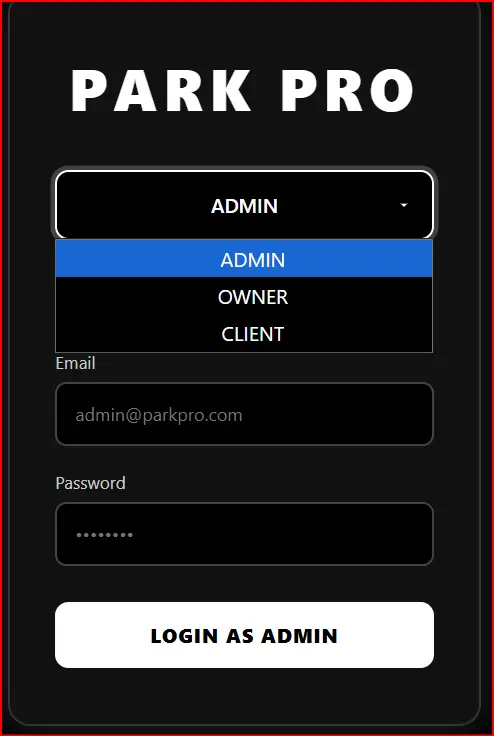
- LOGIN FOR ALL 3 ROLES
- REGISTER only for Owner & Client
- After registration → Shows big button: "LOGIN AS OWNER" or "LOGIN AS CLIENT"
- Admin always has direct login
- Data saved in browser (localStorage) – remembers registration
- Strong password + email + Nepali phone validation
Admin Demo: Email: [email protected] Pass: Admin@2025
Register Owner/Client once → next time just click LOGIN AS OWNER/CLIENT
<!DOCTYPE html> <html lang="en"> <head> <meta charset="UTF-8"> <meta name="viewport" content="width=device-width, initial-scale=1.0"> <title>PARK PRO</title> <style> * { margin: 0; padding: 0; box-sizing: border-box; font-family: 'Segoe UI', Tahoma, Geneva, Verdana, sans-serif; } body { background: #000; color: #fff; min-height: 100vh; display: flex; align-items: center; justify-content: center; padding: 20px; } .container { background: #111; padding: 50px 40px; border-radius: 20px; width: 100%; max-width: 420px; box-shadow: 0 0 30px rgba(255, 255, 255, 0.15); border: 2px solid #333; text-align: center; } .title { font-size: 3.2rem; font-weight: 900; letter-spacing: 6px; margin-bottom: 40px; color: #fff; } /* Role Dropdown */ .role-select { margin-bottom: 35px; } select { width: 100%; padding: 18px; background: #000; color: #fff; border: 2px solid #fff; border-radius: 12px; font-size: 1.1rem; font-weight: 600; text-align: center; appearance: none; cursor: pointer; background-image: url("data:image/svg+xml;charset=UTF-8,%3csvg xmlns='http://www.w3.org/2000/svg' viewBox='0 0 24 24' fill='%23ffffff'%3e%3cpath d='M7 10l5 5 5-5z'/%3e%3c/svg%3e"); background-repeat: no-repeat; background-position: right 18px center; background-size: 14px; } select:focus { outline: none; box-shadow: 0 0 0 4px rgba(255, 255, 255, 0.2); } /* Form Styling */ .form-group { margin-bottom: 22px; text-align: left; } label { display: block; margin-bottom: 8px; color: #ccc; font-size: 0.95rem; } input { width: 100%; padding: 16px; background: #000; border: 2px solid #444; border-radius: 10px; color: #fff; font-size: 1rem; } input:focus { outline: none; border-color: #fff; box-shadow: 0 0 0 3px rgba(255, 255, 255, 0.15); } .error { color: #ff4444; font-size: 0.85rem; margin-top: 6px; display: none; } .success { color: #00ff88; font-size: 1rem; margin-top: 15px; font-weight: 600; display: none; } button { width: 100%; padding: 18px; background: #fff; color: #000; border: none; border-radius: 12px; font-size: 1.1rem; font-weight: 800; cursor: pointer; transition: all 0.3s ease; text-transform: uppercase; letter-spacing: 1px; margin-top: 10px; } button:hover { background: #eee; transform: translateY(-3px); } .login-buttons { display: none; margin-top: 30px; gap: 15px; flex-direction: column; } .login-buttons.active { display: flex; } .login-btn { background: #333; color: #fff; border: 2px solid #fff; } .login-btn:hover { background: #555; } .form-section { display: none; } .form-section.active { display: block; animation: fade 0.5s ease; } @keyframes fade { from { opacity: 0; } to { opacity: 1; } } .registered-msg { color: #00ff88; font-weight: 600; margin: 20px 0; font-size: 1.1rem; } </style> </head> <body> <div class="container"> <h1 class="title">PARK PRO</h1> <!-- Role Selector --> <div class="role-select"> <select id="roleSelect"> <option value="admin">ADMIN</option> <option value="owner">OWNER</option> <option value="client">CLIENT</option> </select> </div> <!-- Forms --> <div class="form-container"> <!-- Admin Login --> <div id="admin-form" class="form-section active"> <h2 style="margin-bottom:25px; font-size:1.8rem;">ADMIN LOGIN</h2> <div class="form-group"> <label>Email</label> <input type="email" id="admin-email" placeholder="[email protected]"> <div class="error" id="admin-email-error"></div> </div> <div class="form-group"> <label>Password</label> <input type="password" id="admin-password" placeholder="••••••••"> <div class="error" id="admin-pass-error"></div> </div> <button onclick="adminLogin()">LOGIN AS ADMIN</button> <div class="success" id="admin-success"></div> </div> <!-- Owner Form (Register + Login) --> <div id="owner-form" class="form-section"> <div id="owner-register-form"> <h2 style="margin-bottom:25px; font-size:1.8rem;">OWNER REGISTER</h2> <div class="form-group"> <label>Full Name</label> <input type="text" id="owner-name" placeholder="Your name"> <div class="error" id="owner-name-error"></div> </div> <div class="form-group"> <label>Email</label> <input type="email" id="owner-email-reg" placeholder="[email protected]"> <div class="error" id="owner-email-reg-error"></div> </div> <div class="form-group"> <label>Parking Lot</label> <input type="text" id="owner-parking" placeholder="Parking name"> <div class="error" id="owner-parking-error"></div> </div> <div class="form-group"> <label>Password</label> <input type="password" id="owner-password-reg" placeholder="8+ chars with symbol"> <div class="error" id="owner-pass-reg-error"></div> </div> <button onclick="ownerRegister()">REGISTER OWNER</button> <div class="success" id="owner-reg-success"></div> </div> <div id="owner-login-form" style="display:none;"> <h2 style="margin-bottom:25px; font-size:1.8rem;">OWNER LOGIN</h2> <div class="form-group"> <label>Email</label> <input type="email" id="owner-email-login" placeholder="Your registered email"> <div class="error" id="owner-email-login-error"></div> </div> <div class="form-group"> <label>Password</label> <input type="password" id="owner-password-login" placeholder="••••••••"> <div class="error" id="owner-pass-login-error"></div> </div> <button onclick="ownerLogin()">LOGIN AS OWNER</button> <div class="success" id="owner-login-success"></div> </div> <div id="owner-registered" style="display:none;"> <div class="registered-msg">OWNER ACCOUNT READY</div> <div class="login-buttons" id="owner-buttons"> <button class="login-btn" onclick="showOwnerLogin()">LOGIN AS OWNER</button> </div> </div> </div> <!-- Client Form (Register + Login) --> <div id="client-form" class="form-section"> <div id="client-register-form"> <h2 style="margin-bottom:25px; font-size:1.8rem;">CLIENT REGISTER</h2> <div class="form-group"> <label>Full Name</label> <input type="text" id="client-name" placeholder="Your name"> <div class="error" id="client-name-error"></div> </div> <div class="form-group"> <label>Email</label> <input type="email" id="client-email-reg" placeholder="[email protected]"> <div class="error" id="client-email-reg-error"></div> </div> <div class="form-group"> <label>Phone</label> <input type="tel" id="client-phone" placeholder="+977 98XXXXXXXX"> <div class="error" id="client-phone-error"></div> </div> <div class="form-group"> <label>Password</label> <input type="password" id="client-password-reg" placeholder="Strong password"> <div class="error" id="client-pass-reg-error"></div> </div> <button onclick="clientRegister()">REGISTER CLIENT</button> <div class="success" id="client-reg-success"></div> </div> <div id="client-login-form" style="display:none;"> <h2 style="margin-bottom:25px; font-size:1.8rem;">CLIENT LOGIN</h2> <div class="form-group"> <label>Email</label> <input type="email" id="client-email-login" placeholder="Your email"> <div class="error" id="client-email-login-error"></div> </div> <div class="form-group"> <label>Password</label> <input type="password" id="client-password-login" placeholder="••••••••"> <div class="error" id="client-pass-login-error"></div> </div> <button onclick="clientLogin()">LOGIN AS CLIENT</button> <div class="success" id="client-login-success"></div> </div> <div id="client-registered" style="display:none;"> <div class="registered-msg">CLIENT ACCOUNT READY</div> <div class="login-buttons" id="client-buttons"> <button class="login-btn" onclick="showClientLogin()">LOGIN AS CLIENT</button> </div> </div> </div> </div> </div> <script> const roleSelect = document.getElementById('roleSelect'); let ownerRegistered = false; let clientRegistered = false; roleSelect.addEventListener('change', () => { const role = roleSelect.value; document.querySelectorAll('.form-section').forEach(f => f.classList.remove('active')); document.getElementById(`${role}-form`).classList.add('active'); // Auto show login if registered if (role === 'owner' && ownerRegistered) { document.getElementById('owner-registered').style.display = 'block'; document.getElementById('owner-register-form').style.display = 'none'; document.getElementById('owner-login-form').style.display = 'none'; document.getElementById('owner-buttons').classList.add('active'); } if (role === 'client' && clientRegistered) { document.getElementById('client-registered').style.display = 'block'; document.getElementById('client-register-form').style.display = 'none'; document.getElementById('client-login-form').style.display = 'none'; document.getElementById('client-buttons').classList.add('active'); } }); function validateEmail(email) { return /^[^\s@]+@[^\s@]+\.[^\s@]+$/.test(email); } function validatePassword(pw) { return /^(?=.*[a-z])(?=.*[A-Z])(?=.*\d)(?=.*[!@#$%^&*])[A-Za-z\d!@#$%^&*]{8,}$/.test(pw); } function clearErrors() { document.querySelectorAll('.error').forEach(e => e.style.display = 'none'); document.querySelectorAll('.success').forEach(s => s.style.display = 'none'); } function showError(id, msg) { const el = document.getElementById(id); el.textContent = msg; el.style.display = 'block'; } // ADMIN LOGIN function adminLogin() { clearErrors(); const email = document.getElementById('admin-email').value.trim(); const pass = document.getElementById('admin-password').value; if (email === '[email protected]' && pass === 'Admin@2025') { document.getElementById('admin-success').textContent = 'ADMIN LOGIN SUCCESSFUL'; document.getElementById('admin-success').style.display = 'block'; } else { showError('admin-pass-error', 'Invalid admin credentials'); } } // OWNER REGISTER function ownerRegister() { clearErrors(); const name = document.getElementById('owner-name').value.trim(); const email = document.getElementById('owner-email-reg').value.trim(); const parking = document.getElementById('owner-parking').value.trim(); const pass = document.getElementById('owner-password-reg').value; if (!name || !email || !parking || !pass) return showError('owner-name-error', 'All fields required'); if (!validateEmail(email)) return showError('owner-email-reg-error', 'Valid email needed'); if (!validatePassword(pass)) return showError('owner-pass-reg-error', '8+ chars, 1 Upper, 1 lower, 1 num, 1 symbol'); ownerRegistered = true; localStorage.setItem('ownerEmail', email); localStorage.setItem('ownerPass', pass); document.getElementById('owner-register-form').style.display = 'none'; document.getElementById('owner-registered').style.display = 'block'; document.getElementById('owner-buttons').classList.add('active'); document.getElementById('owner-reg-success').textContent = 'OWNER REGISTERED!'; document.getElementById('owner-reg-success').style.display = 'block'; } function showOwnerLogin() { document.getElementById('owner-registered').style.display = 'none'; document.getElementById('owner-login-form').style.display = 'block'; } function ownerLogin() { clearErrors(); const email = document.getElementById('owner-email-login').value.trim(); const pass = document.getElementById('owner-password-login').value; const savedEmail = localStorage.getItem('ownerEmail'); const savedPass = localStorage.getItem('ownerPass'); if (email === savedEmail && pass === savedPass) { document.getElementById('owner-login-success').textContent = 'OWNER LOGIN SUCCESSFUL'; document.getElementById('owner-login-success').style.display = 'block'; } else { showError('owner-pass-login-error', 'Wrong email or password'); } } // CLIENT REGISTER function clientRegister() { clearErrors(); const name = document.getElementById('client-name').value.trim(); const email = document.getElementById('client-email-reg').value.trim(); const phone = document.getElementById('client-phone').value.trim(); const pass = document.getElementById('client-password-reg').value; if (!validateEmail(email)) return showError('client-email-reg-error', 'Valid email required'); if (!/^\+977[\s-]?[0-9]{10}$/.test(phone.replace(/[\s-]/g, ''))) return showError('client-phone-error', '+977 format only'); if (!validatePassword(pass)) return showError('client-pass-reg-error', 'Password too weak'); clientRegistered = true; localStorage.setItem('clientEmail', email); localStorage.setItem('clientPass', pass); document.getElementById('client-register-form').style.display = 'none'; document.getElementById('client-registered').style.display = 'block'; document.getElementById('client-buttons').classList.add('active'); document.getElementById('client-reg-success').textContent = 'CLIENT REGISTERED!'; document.getElementById('client-reg-success').style.display = 'block'; } function showClientLogin() { document.getElementById('client-registered').style.display = 'none'; document.getElementById('client-login-form').style.display = 'block'; } function clientLogin() { clearErrors(); const email = document.getElementById('client-email-login').value.trim(); const pass = document.getElementById('client-password-login').value; const savedEmail = localStorage.getItem('clientEmail'); const savedPass = localStorage.getItem('clientPass'); if (email === savedEmail && pass === savedPass) { document.getElementById('client-login-success').textContent = 'CLIENT LOGIN SUCCESSFUL'; document.getElementById('client-login-success').style.display = 'block'; } else { showError('client-pass-login-error', 'Wrong email or password'); } } // Check if already registered on load window.onload = () => { if (localStorage.getItem('ownerEmail')) ownerRegistered = true; if (localStorage.getItem('clientEmail')) clientRegistered = true; }; // Enter key document.addEventListener('keypress', e => { if (e.key === 'Enter') { const role = roleSelect.value; if (role === 'admin') adminLogin(); else if (role === 'owner' && ownerRegistered && document.getElementById('owner-login-form').style.display === 'block') ownerLogin(); else if (role === 'client' && clientRegistered && document.getElementById('client-login-form').style.display === 'block') clientLogin(); } }); </script> </body> </html> HTML Login & Registration Forms – Parking / Management Systems & Modern UI Designs (Related to HTML Forms)
Login & Register Form for Park Management System with Dropdown:
This type of HTML form combines login and registration functionality for parking or park management systems. It often uses dropdown menus to switch between login and sign-up options in a single interface, making it more user-friendly and compact for web applications.
Read more: https://macronepal.com/blog/login-and-register-form-for-park-managmet-system-with-dropdown/
Dropdown Login Form for Parking System:
A dropdown login form allows users to select options like user type (admin/user) before logging in. This improves system control and is commonly used in parking management systems to separate different access levels.
Read more: https://macronepal.com/blog/drop-down-login-form-for-parking-system/
Dropdown Login Form for Park Management System:
Similar to parking systems, this login design uses dropdown selection to manage different roles such as staff, admin, or users. It simplifies authentication while improving system organization.
Read more: https://macronepal.com/blog/drop-down-login-form-for-park-managment-system/
Simple Login Form for Park Management System:
A basic login form built using HTML that includes fields like username and password. It is used for secure access to park management dashboards and is easy to design and implement.
Read more: https://macronepal.com/blog/simple-login-form-code-for-park-managment-system/
AI Style Glow Fullscreen Overlay Login Form:
This modern login form uses glowing UI effects and full-screen overlays to create an advanced and attractive design. It enhances user experience using CSS animations and visual effects.
Read more: https://macronepal.com/blog/ai-style-glow-fullscreen-overlay-login-form/
Glassmorphism Login Form:
Glassmorphism is a modern UI design style that uses blur, transparency, and frosted glass effects. It makes login forms look stylish and professional while maintaining readability.
Read more: https://macronepal.com/blog/what-is-glassmorphism-login-form/
Emoji Background Overlay Full Screen Login Form:
This login design uses emoji-based backgrounds with full-screen overlay effects to create a fun and engaging user interface while keeping login functionality simple.
Read more: https://macronepal.com/blog/emoji-background-overlay-full-screen-login-form/
Minimal Center Alignment Fullscreen Overlay Login Form:
A clean and minimal login form centered on the screen. It focuses on simplicity, proper alignment, and distraction-free user experience.
Read more: https://macronepal.com/blog/minimal-center-alignment-fullscreen-overlay-login-form/
Image Blur Focus Fullscreen Overlay Login Form:
This login design uses blurred background images with a focused login box in the center, improving visual depth and user attention on the form.
Read more: https://macronepal.com/blog/image-blur-focus-fullscreen-overlay-login-form/
Geometric Pattern Fullscreen Overlay Login Form:
A creative login form design that uses geometric patterns as backgrounds with overlay effects, giving a modern and structured visual appearance.
Read more: https://macronepal.com/blog/geometric-pattern-fullscreen-overlay-login-form/