Introduction
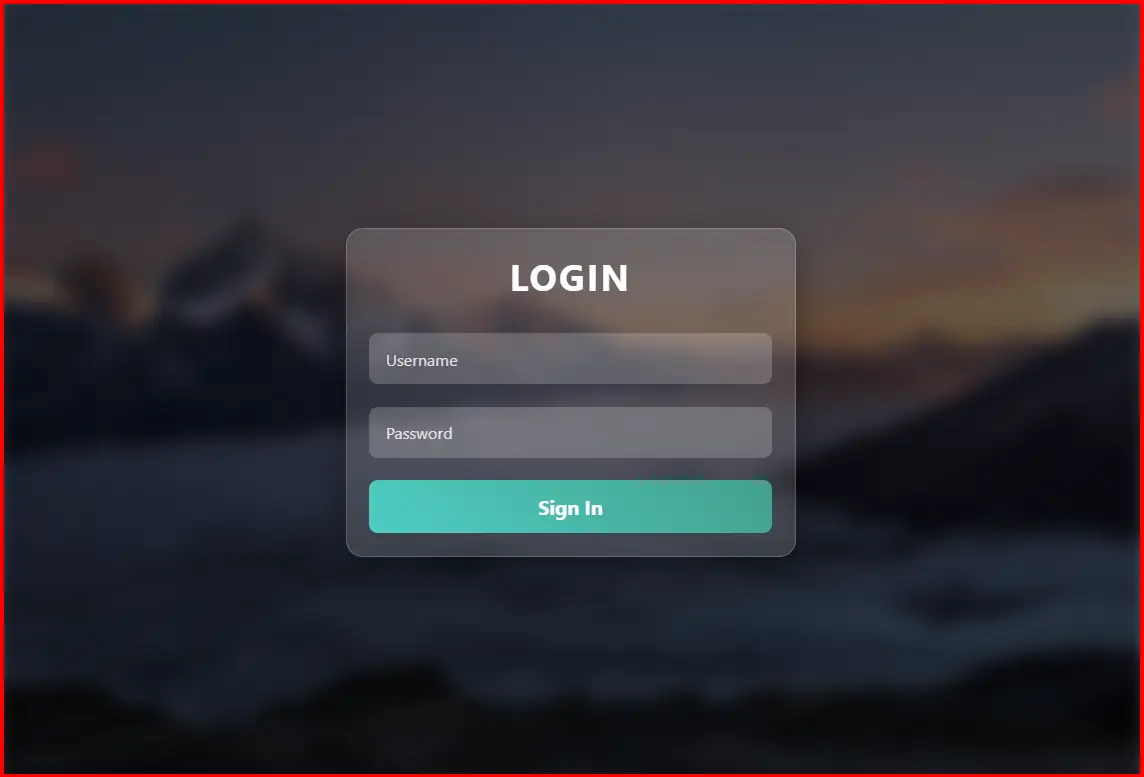
The Image Blur Focus Login Form is an elegant and modern web login interface designed to emphasize user focus and visual clarity. It uses a blurred photographic background that dynamically adjusts its blur intensity based on user interaction. The form itself remains sharp, ensuring readability and precision.
This design is best suited for creative portfolios, technology platforms, and elegant business websites that want to deliver a visually appealing first impression.
Main Features
1. Dynamic Background Blur
- Uses a full-screen background image with a subtle blur effect applied using the CSS
filterproperty. - When users interact with the form (focus on inputs), the background blur dynamically increases, drawing attention to the login form.
- When focus is lost, the background returns to its default blur level.
- Controlled through JavaScript events (
focusinandfocusout) for smooth transitions.
2. Dark Overlay for Readability
- A semi-transparent dark overlay is placed on top of the background image.
- Enhances contrast between the form and the image for better visibility and focus.
- Prevents distraction from bright or colorful images.
3. Glassmorphism Login Container
- The login form container has a transparent glass effect using
rgba()andbackdrop-filterfor light diffusion. - Includes rounded corners, soft shadows, and gradient highlights for depth.
- Maintains sharpness even when the background blurs, emphasizing user interaction.
4. Floating Label Inputs
- Input fields have floating labels that rise and shrink when the user types or focuses.
- Enhances clarity while keeping the design minimalist.
- Color accent changes on focus using shades of teal and aqua (
#4ecdc4,#44a08d).
5. Animated Gradient Login Button
- The sign-in button is styled with a diagonal gradient that subtly shifts color on hover.
- Adds a slight elevation animation (
transform: translateY(-2px)) for tactile feedback. - Modern, responsive, and consistent with the color theme.
6. Error Message Feedback
- Displays a red error message dynamically when login validation fails.
- The message fades automatically after 3 seconds to avoid clutter.
- Basic credential check using demo credentials (
admin/password123).
7. Responsive and Cross-Device Compatibility
- Automatically scales for all screen sizes using media queries.
- Maintains proportion and readability on mobile, tablet, and desktop devices.
Technical Details
- Languages Used: HTML5, CSS3, JavaScript
- Styling Techniques: Glassmorphism, backdrop-filter blur, gradient overlays, floating labels
- Animation and Interaction: Dynamic blur effect via JavaScript; smooth transitions for hover and focus
- Responsive Design: CSS media queries for mobile optimization
Conclusion
The Image Blur Focus Login Form offers a refined and immersive user experience through motion-based background interaction and clean visual hierarchy. It elegantly merges usability and design, creating an environment where users can focus entirely on logging in.
This form’s dynamic blur interaction and glass-effect design make it ideal for modern web applications, creative portfolios, photography sites, and premium business dashboards. It is lightweight, visually engaging, and easy to integrate into any web project.
<!DOCTYPE html> <html lang="en"> <head> <meta charset="UTF-8"> <meta name="viewport" content="width=device-width, initial-scale=1.0"> <title>Image Blur Focus Login Form</title> <style> * { margin: 0; padding: 0; box-sizing: border-box; font-family: 'Segoe UI', Tahoma, Geneva, Verdana, sans-serif; } body { min-height: 100vh; display: flex; justify-content: center; align-items: center; overflow: hidden; position: relative; } .bg-image { position: fixed; top: 0; left: 0; width: 100%; height: 100%; background-image: url('https://images.unsplash.com/photo-1506905925346-21bda4d32df4?ixlib=rb-4.0.3&auto=format&fit=crop&w=2070&q=80'); background-size: cover; background-position: center; filter: blur(8px); z-index: -2; } .bg-overlay { position: fixed; top: 0; left: 0; width: 100%; height: 100%; background: rgba(0, 0, 0, 0.6); /* Dark overlay to enhance readability */ z-index: -1; } .container { position: relative; width: 100%; max-width: 400px; padding: 20px; background: rgba(255, 255, 255, 0.15); border-radius: 15px; backdrop-filter: blur(0px); /* Form stays sharp, no blur */ box-shadow: 0 8px 32px rgba(0, 0, 0, 0.37); border: 1px solid rgba(255, 255, 255, 0.18); z-index: 1; } .login-form { display: flex; flex-direction: column; gap: 20px; } h2 { color: #fff; text-align: center; font-size: 2rem; margin-bottom: 10px; text-transform: uppercase; letter-spacing: 2px; } .input-group { position: relative; } input { width: 100%; padding: 12px 15px; background: rgba(255, 255, 255, 0.2); border: none; border-radius: 8px; color: #fff; font-size: 1rem; outline: none; transition: all 0.3s ease; } input:focus { background: rgba(255, 255, 255, 0.3); box-shadow: 0 0 10px rgba(255, 255, 255, 0.5); } input::placeholder { color: rgba(255, 255, 255, 0.7); } label { position: absolute; top: 50%; left: 15px; transform: translateY(-50%); color: rgba(255, 255, 255, 0.8); font-size: 0.9rem; pointer-events: none; transition: all 0.3s ease; } input:focus + label, input:not(:placeholder-shown) + label { top: -10px; font-size: 0.75rem; color: #4ecdc4; background: transparent; padding: 0 5px; } .login-btn { padding: 12px; background: linear-gradient(45deg, #4ecdc4, #44a08d); border: none; border-radius: 8px; color: #fff; font-size: 1.1rem; font-weight: bold; cursor: pointer; transition: all 0.3s ease; } .login-btn:hover { background: linear-gradient(45deg, #6ee0d2, #5cb3a1); transform: translateY(-2px); } .error-message { color: #ff6b6b; font-size: 0.9rem; text-align: center; display: none; } /* Optional: Enhance focus by slightly adjusting background blur on form interaction */ .login-form:focus-within ~ .bg-image { filter: blur(10px); /* Increase blur when interacting with form */ } @media (max-width: 480px) { .container { margin: 20px; padding: 15px; } h2 { font-size: 1.5rem; } } </style> </head> <body> <div class="bg-image"></div> <div class="bg-overlay"></div> <div class="container"> <form class="login-form" id="loginForm"> <h2>Login</h2> <div class="input-group"> <input type="text" id="username" placeholder=" " required> <label for="username">Username</label> </div> <div class="input-group"> <input type="password" id="password" placeholder=" " required> <label for="password">Password</label> </div> <button type="submit" class="login-btn">Sign In</button> <p class="error-message" id="errorMessage">Invalid username or password</p> </form> </div> <script> const form = document.getElementById('loginForm'); const errorMessage = document.getElementById('errorMessage'); const bgImage = document.querySelector('.bg-image'); // Optional: Dynamically increase blur on form focus for more "focus" effect form.addEventListener('focusin', () => { bgImage.style.filter = 'blur(12px)'; }); form.addEventListener('focusout', () => { if (!form.querySelector(':focus')) { bgImage.style.filter = 'blur(8px)'; } }); form.addEventListener('submit', (e) => { e.preventDefault(); const username = document.getElementById('username').value; const password = document.getElementById('password').value; // Basic validation (for demo purposes) if (username === '' || password === '') { errorMessage.style.display = 'block'; setTimeout(() => { errorMessage.style.display = 'none'; }, 3000); return; } // Simulate login (replace with actual authentication logic) if (username === 'admin' && password === 'password123') { alert('Login successful!'); form.reset(); } else { errorMessage.style.display = 'block'; setTimeout(() => { errorMessage.style.display = 'none'; }, 3000); } }); </script> </body> </html> HTML Login & Registration Forms – Parking / Management Systems & Modern UI Designs (Related to HTML Forms)
Login & Register Form for Park Management System with Dropdown:
This type of HTML form combines login and registration functionality for parking or park management systems. It often uses dropdown menus to switch between login and sign-up options in a single interface, making it more user-friendly and compact for web applications.
Read more: https://macronepal.com/blog/login-and-register-form-for-park-managmet-system-with-dropdown/
Dropdown Login Form for Parking System:
A dropdown login form allows users to select options like user type (admin/user) before logging in. This improves system control and is commonly used in parking management systems to separate different access levels.
Read more: https://macronepal.com/blog/drop-down-login-form-for-parking-system/
Dropdown Login Form for Park Management System:
Similar to parking systems, this login design uses dropdown selection to manage different roles such as staff, admin, or users. It simplifies authentication while improving system organization.
Read more: https://macronepal.com/blog/drop-down-login-form-for-park-managment-system/
Simple Login Form for Park Management System:
A basic login form built using HTML that includes fields like username and password. It is used for secure access to park management dashboards and is easy to design and implement.
Read more: https://macronepal.com/blog/simple-login-form-code-for-park-managment-system/
AI Style Glow Fullscreen Overlay Login Form:
This modern login form uses glowing UI effects and full-screen overlays to create an advanced and attractive design. It enhances user experience using CSS animations and visual effects.
Read more: https://macronepal.com/blog/ai-style-glow-fullscreen-overlay-login-form/
Glassmorphism Login Form:
Glassmorphism is a modern UI design style that uses blur, transparency, and frosted glass effects. It makes login forms look stylish and professional while maintaining readability.
Read more: https://macronepal.com/blog/what-is-glassmorphism-login-form/
Emoji Background Overlay Full Screen Login Form:
This login design uses emoji-based backgrounds with full-screen overlay effects to create a fun and engaging user interface while keeping login functionality simple.
Read more: https://macronepal.com/blog/emoji-background-overlay-full-screen-login-form/
Minimal Center Alignment Fullscreen Overlay Login Form:
A clean and minimal login form centered on the screen. It focuses on simplicity, proper alignment, and distraction-free user experience.
Read more: https://macronepal.com/blog/minimal-center-alignment-fullscreen-overlay-login-form/
Image Blur Focus Fullscreen Overlay Login Form:
This login design uses blurred background images with a focused login box in the center, improving visual depth and user attention on the form.
Read more: https://macronepal.com/blog/image-blur-focus-fullscreen-overlay-login-form/
Geometric Pattern Fullscreen Overlay Login Form:
A creative login form design that uses geometric patterns as backgrounds with overlay effects, giving a modern and structured visual appearance.
Read more: https://macronepal.com/blog/geometric-pattern-fullscreen-overlay-login-form/