<!DOCTYPE html>
<html lang="en">
<head>
<meta charset="UTF-8">
<meta name="viewport" content="width=device-width, initial-scale=1.0">
<title>Neumorphic Card Login Form</title>
<style>
body {
font-family: 'Segoe UI', Tahoma, Geneva, Verdana, sans-serif;
display: flex;
justify-content: center;
align-items: center;
min-height: 100vh;
margin: 0;
background: #e0e0e0;
padding: 20px;
box-sizing: border-box;
}
.login-card {
background: #e0e0e0;
border-radius: 20px;
box-shadow: 10px 10px 20px #bebebe, -10px -10px 20px #ffffff;
padding: 40px;
width: 100%;
max-width: 400px;
position: relative;
}
.login-card h2 {
text-align: center;
margin-bottom: 30px;
color: #333;
font-size: 28px;
font-weight: 600;
text-shadow: 1px 1px 2px #bebebe, -1px -1px 2px #ffffff;
}
.form-group {
margin-bottom: 24px;
position: relative;
}
.form-group label {
display: block;
margin-bottom: 8px;
color: #555;
font-weight: 500;
font-size: 14px;
}
.form-group input {
width: 100%;
padding: 14px 16px;
border: none;
border-radius: 12px;
font-size: 16px;
background: #e0e0e0;
box-shadow: inset 6px 6px 12px #bebebe, inset -6px -6px 12px #ffffff;
color: #333;
transition: all 0.3s ease;
box-sizing: border-box;
}
.form-group input:focus {
outline: none;
box-shadow: inset 3px 3px 6px #bebebe, inset -3px -3px 6px #ffffff;
background: #e8e8e8;
}
.form-group input::placeholder {
color: #888;
}
.login-button {
width: 100%;
padding: 14px;
border: none;
border-radius: 12px;
font-size: 16px;
font-weight: 600;
cursor: pointer;
background: #e0e0e0;
box-shadow: 6px 6px 12px #bebebe, -6px -6px 12px #ffffff;
color: #333;
transition: all 0.3s ease;
margin-top: 8px;
}
.login-button:hover {
box-shadow: 3px 3px 6px #bebebe, -3px -3px 6px #ffffff;
transform: translateY(-2px);
}
.login-button:active {
box-shadow: inset 3px 3px 6px #bebebe, inset -3px -3px 6px #ffffff;
transform: translateY(0);
}
.error {
color: #e74c3c;
font-size: 14px;
text-align: center;
margin-top: 16px;
display: none;
padding: 10px;
background: #e0e0e0;
border-radius: 8px;
box-shadow: inset 3px 3px 6px #bebebe, inset -3px -3px 6px #ffffff;
}
.forgot-password {
text-align: center;
margin-top: 20px;
}
.forgot-password a {
color: #555;
text-decoration: none;
font-size: 14px;
transition: color 0.3s ease;
}
.forgot-password a:hover {
color: #333;
text-decoration: underline;
}
@media (max-width: 480px) {
.login-card {
padding: 30px 24px;
margin: 10px;
}
}
</style>
</head>
<body>
<div class="login-card">
<h2>Sign In</h2>
<form id="loginForm">
<div class="form-group">
<label for="username">Username</label>
<input type="text" id="username" placeholder="Enter your username" required>
</div>
<div class="form-group">
<label for="password">Password</label>
<input type="password" id="password" placeholder="Enter your password" required>
</div>
<button type="submit" class="login-button">Sign In</button>
<div class="error" id="error-message">Invalid username or password. Please try again.</div>
</form>
<div class="forgot-password">
<a href="#">Forgot your password?</a>
</div>
</div>
<script>
document.getElementById('loginForm').addEventListener('submit', function(e) {
e.preventDefault();
handleLogin();
});
function handleLogin() {
const username = document.getElementById('username').value.trim();
const password = document.getElementById('password').value;
const errorMessage = document.getElementById('error-message');
// Simple demo validation
if (username === "admin" && password === "password123") {
alert("Login successful! Welcome to the dashboard.");
errorMessage.style.display = 'none';
} else {
errorMessage.style.display = 'block';
document.getElementById('password').focus();
}
}
// Add enter key support
document.addEventListener('keypress', function(e) {
if (e.key === 'Enter') {
const activeElement = document.activeElement;
if (activeElement.tagName === 'INPUT') {
handleLogin();
}
}
});
</script>
</body>
</html>
Introduction
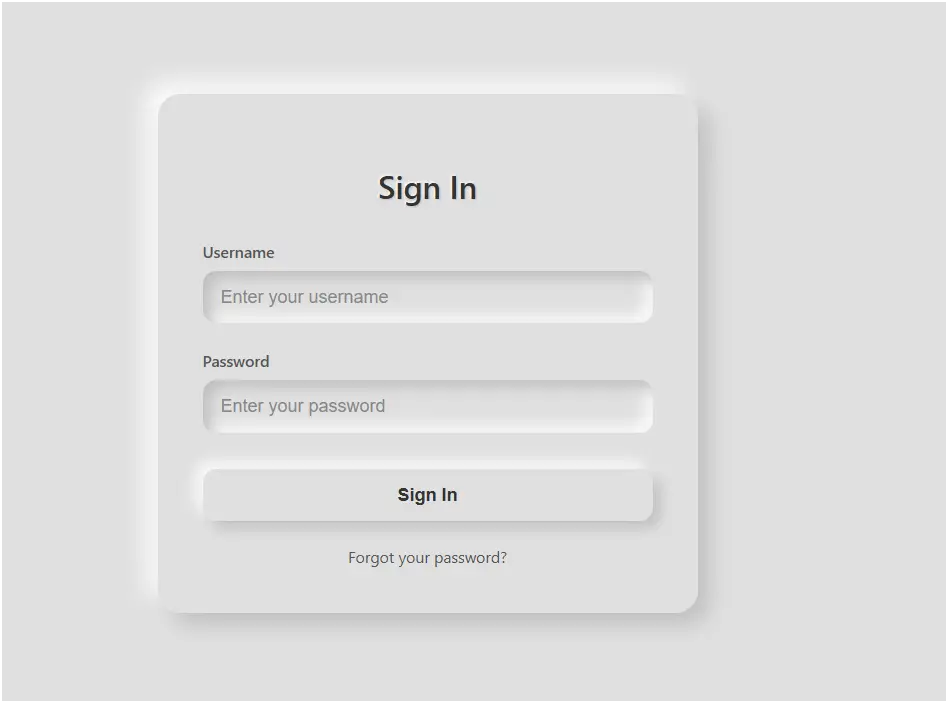
This code creates a neumorphic login form using HTML, CSS, and JavaScript. Neumorphism is a modern UI design style that blends flat design with soft shadows, giving elements a 3D embossed or pressed effect. The form is simple, clean, and elegant, designed to provide users with a smooth, modern login experience.
Features of the Code
- Neumorphic Design – Uses light and dark shadows to make the card, inputs, and button appear 3D and soft.
- Simple Background – A plain gray background (#e0e0e0) enhances the neumorphism style.
- Interactive Input Fields – Inputs have an inset shadow effect that makes them look pressed when typing.
- Stylized Login Button – The button has raised and pressed effects when hovered or clicked.
- Error Message Styling – Error messages also use neumorphic inset shadow effects for consistency.
- Forgot Password Option – Provides a link for password recovery.
- Responsive Design – Adjusts padding and margins for smaller screens.
- JavaScript Validation – Checks username and password (demo:
admin/password123). - Enter Key Support – Users can press Enter to log in, improving accessibility.
How It Works
- HTML Structure
- A
.login-cardcontainer holds the form elements. - The form includes a username field, password field, login button, error message, and a "Forgot password" link.
- A
- CSS Styling
- Neumorphism: Achieved using two shadows: a dark shadow (bottom-right) and a light shadow (top-left).
box-shadow: 10px 10px 20px #bebebe, -10px -10px 20px #ffffff; - Inputs: Styled with inset shadows to appear pressed into the background when typing.
- Button: Appears raised normally, looks pressed when clicked.
- Error Box: Matches neumorphic style with inset shadows.
- Responsiveness: A media query ensures the form looks neat on smaller devices.
- Neumorphism: Achieved using two shadows: a dark shadow (bottom-right) and a light shadow (top-left).
- JavaScript Functionality
- Prevents normal form submission (
e.preventDefault()). - Validation: If username =
"admin"and password ="password123", shows a success alert; otherwise displays the error box. - Focus Handling: If login fails, the password field is auto-focused.
- Enter Key Support: Users can press Enter to trigger login inside input fields.
- Prevents normal form submission (
Conclusion
This code is a great example of neumorphic UI design applied to a login form. It combines visual aesthetics (3D soft shadows) with functionality (validation, error handling, keyboard support) to create a user-friendly login interface. While the authentication here is only a demo, in real-world applications, it should be connected to a secure backend system for safe login management.
HTML Login & Registration Forms – Parking / Management Systems & Modern UI Designs (Related to HTML Forms)
Login & Register Form for Park Management System with Dropdown:
This type of HTML form combines login and registration functionality for parking or park management systems. It often uses dropdown menus to switch between login and sign-up options in a single interface, making it more user-friendly and compact for web applications.
Read more: https://macronepal.com/blog/login-and-register-form-for-park-managmet-system-with-dropdown/
Dropdown Login Form for Parking System:
A dropdown login form allows users to select options like user type (admin/user) before logging in. This improves system control and is commonly used in parking management systems to separate different access levels.
Read more: https://macronepal.com/blog/drop-down-login-form-for-parking-system/
Dropdown Login Form for Park Management System:
Similar to parking systems, this login design uses dropdown selection to manage different roles such as staff, admin, or users. It simplifies authentication while improving system organization.
Read more: https://macronepal.com/blog/drop-down-login-form-for-park-managment-system/
Simple Login Form for Park Management System:
A basic login form built using HTML that includes fields like username and password. It is used for secure access to park management dashboards and is easy to design and implement.
Read more: https://macronepal.com/blog/simple-login-form-code-for-park-managment-system/
AI Style Glow Fullscreen Overlay Login Form:
This modern login form uses glowing UI effects and full-screen overlays to create an advanced and attractive design. It enhances user experience using CSS animations and visual effects.
Read more: https://macronepal.com/blog/ai-style-glow-fullscreen-overlay-login-form/
Glassmorphism Login Form:
Glassmorphism is a modern UI design style that uses blur, transparency, and frosted glass effects. It makes login forms look stylish and professional while maintaining readability.
Read more: https://macronepal.com/blog/what-is-glassmorphism-login-form/
Emoji Background Overlay Full Screen Login Form:
This login design uses emoji-based backgrounds with full-screen overlay effects to create a fun and engaging user interface while keeping login functionality simple.
Read more: https://macronepal.com/blog/emoji-background-overlay-full-screen-login-form/
Minimal Center Alignment Fullscreen Overlay Login Form:
A clean and minimal login form centered on the screen. It focuses on simplicity, proper alignment, and distraction-free user experience.
Read more: https://macronepal.com/blog/minimal-center-alignment-fullscreen-overlay-login-form/
Image Blur Focus Fullscreen Overlay Login Form:
This login design uses blurred background images with a focused login box in the center, improving visual depth and user attention on the form.
Read more: https://macronepal.com/blog/image-blur-focus-fullscreen-overlay-login-form/
Geometric Pattern Fullscreen Overlay Login Form:
A creative login form design that uses geometric patterns as backgrounds with overlay effects, giving a modern and structured visual appearance.
Read more: https://macronepal.com/blog/geometric-pattern-fullscreen-overlay-login-form/