Introduction
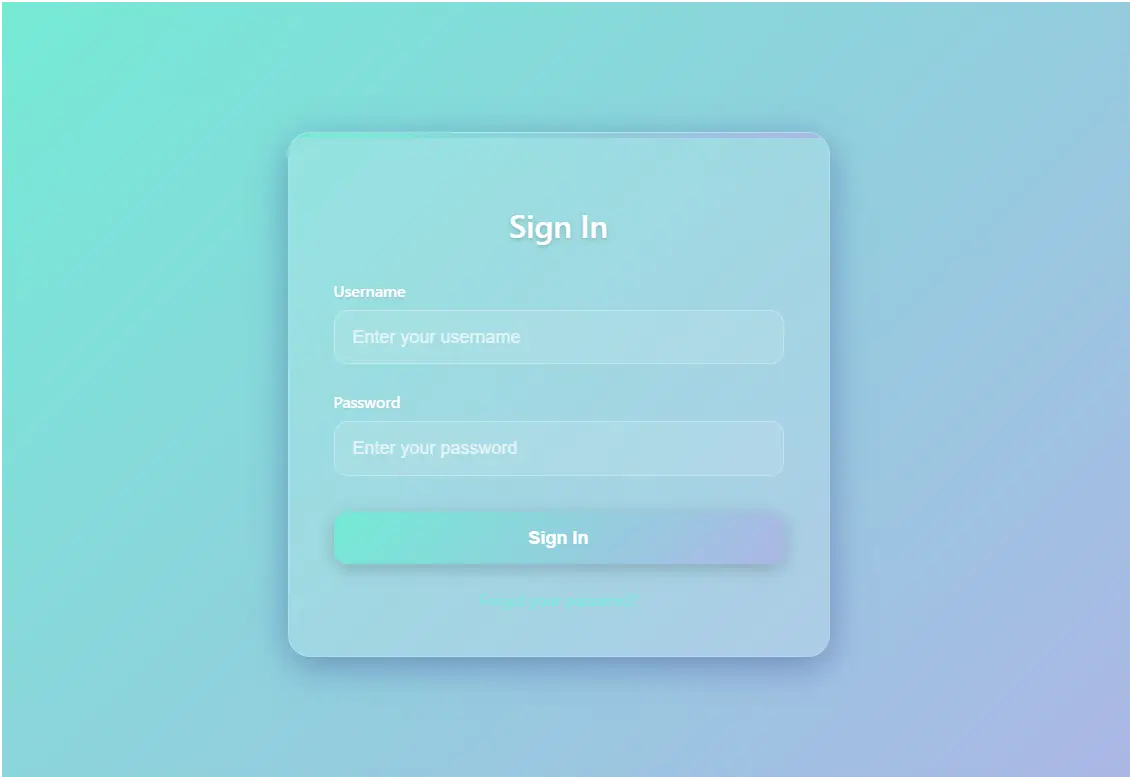
This code creates a glassmorphic login form using HTML, CSS, and JavaScript. Glassmorphism is a modern UI design style that uses frosted glass effects with transparency, blur, and soft shadows to give a futuristic look. The form is fully responsive, interactive, and visually appealing, making it suitable for modern websites and applications.
Features of the Code
- Glassmorphic Design – Transparent card with blur and light shadows that resembles frosted glass.
- Gradient Background – Soft gradient background makes the login form stand out.
- Responsive Layout – The design adapts to smaller screens with padding and margin adjustments.
- Stylized Inputs – Input fields are semi-transparent with glowing effects when focused.
- Interactive Button – Gradient-colored button with hover and active animations.
- Error Handling – Displays a styled error message when login fails.
- Forgot Password Option – Provides a clickable link for password recovery.
- Enter Key Support – Users can press Enter to log in, improving accessibility.
- Demo Authentication – A simple check verifies login with a demo username (
admin) and password (password123).
How It Works
- HTML Structure
- A
divwith the class.login-cardacts as the main card container. - Inside, there are two input fields (username and password), a sign-in button, an error message area, and a "Forgot Password?" link.
- A
- CSS Styling
- Glassmorphism: Achieved with
rgba()transparent background,backdrop-filter: blur(10px), and semi-transparent borders. - Gradient Effects: Both the page background and the button use gradient colors for a modern look.
- Animations: Inputs highlight with border and shadow when focused, and the button shifts slightly upward when hovered.
- Responsiveness: A media query ensures the form looks good on smaller devices.
- Glassmorphism: Achieved with
- JavaScript Functionality
- Form Submission: Prevents default behavior and calls
handleLogin(). - Validation: If the username is
"admin"and password is"password123", a success alert is shown. Otherwise, an error message appears. - Enter Key Support: Allows pressing Enter inside the input fields to trigger login.
- Form Submission: Prevents default behavior and calls
Conclusion
This code is a modern, stylish glassmorphic login form with interactive elements and demo authentication. It combines UI design principles (glassmorphism, gradients, responsiveness) with basic JavaScript functionality (form validation, error handling, keyboard support). While this version is a demo, in real applications it should be connected to a secure backend system for proper authentication.
<!DOCTYPE html>
<html lang="en">
<head>
<meta charset="UTF-8">
<meta name="viewport" content="width=device-width, initial-scale=1.0">
<title>Glassmorphic Card Login Form</title>
<style>
body {
font-family: 'Segoe UI', Tahoma, Geneva, Verdana, sans-serif;
display: flex;
justify-content: center;
align-items: center;
min-height: 100vh;
margin: 0;
background: linear-gradient(135deg, #74ebd5 0%, #acb6e5 100%);
padding: 20px;
box-sizing: border-box;
}
.login-card {
background: rgba(255, 255, 255, 0.15);
border-radius: 20px;
box-shadow: 0 8px 32px rgba(31, 38, 135, 0.37);
backdrop-filter: blur(10px);
-webkit-backdrop-filter: blur(10px);
border: 1px solid rgba(255, 255, 255, 0.18);
padding: 40px;
width: 100%;
max-width: 400px;
position: relative;
overflow: hidden;
}
.login-card::before {
content: '';
position: absolute;
top: 0;
left: 0;
right: 0;
height: 4px;
background: linear-gradient(90deg, #74ebd5, #acb6e5);
}
.login-card h2 {
text-align: center;
margin-bottom: 30px;
color: #fff;
font-size: 28px;
font-weight: 600;
text-shadow: 0 2px 4px rgba(0, 0, 0, 0.2);
}
.form-group {
margin-bottom: 24px;
position: relative;
}
.form-group label {
display: block;
margin-bottom: 8px;
color: #fff;
font-weight: 500;
font-size: 14px;
text-shadow: 0 1px 2px rgba(0, 0, 0, 0.1);
}
.form-group input {
width: 100%;
padding: 14px 16px;
border: 1px solid rgba(255, 255, 255, 0.3);
border-radius: 12px;
font-size: 16px;
background: rgba(255, 255, 255, 0.1);
color: #fff;
transition: all 0.3s ease;
box-sizing: border-box;
}
.form-group input:focus {
outline: none;
border-color: #74ebd5;
background: rgba(255, 255, 255, 0.2);
box-shadow: 0 0 0 3px rgba(116, 235, 213, 0.3);
}
.form-group input::placeholder {
color: rgba(255, 255, 255, 0.7);
}
.login-button {
width: 100%;
padding: 14px;
background: linear-gradient(135deg, #74ebd5 0%, #acb6e5 100%);
color: #fff;
border: none;
border-radius: 12px;
font-size: 16px;
font-weight: 600;
cursor: pointer;
transition: all 0.3s ease;
box-shadow: 0 4px 15px rgba(0, 0, 0, 0.2);
margin-top: 8px;
}
.login-button:hover {
transform: translateY(-2px);
box-shadow: 0 10 Seyue
background: linear-gradient(135deg, #74ebd5 80%, #acb6e5 100%);
}
.login-button:active {
transform: translateY(0);
}
.error {
color: #ff6b6b;
font-size: 14px;
text-align: center;
margin-top: 16px;
display: none;
padding: 10px;
background: rgba(255, 107, 107, 0.2);
border-radius: 8px;
border: 1px solid rgba(255, 107, 107, 0.3);
}
.forgot-password {
text-align: center;
margin-top: 20px;
}
.forgot-password a {
color: #74ebd5;
text-decoration: none;
font-size: 14px;
transition: color 0.3s ease;
}
.forgot-password a:hover {
color: #fff;
text-decoration: underline;
}
@media (max-width: 480px) {
.login-card {
padding: 30px 24px;
margin: 10px;
}
}
</style>
</head>
<body>
<div class="login-card">
<h2>Sign In</h2>
<form id="loginForm">
<div class="form-group">
<label for="username">Username</label>
<input type="text" id="username" placeholder="Enter your username" required>
</div>
<div class="form-group">
<label for="password">Password</label>
<input type="password" id="password" placeholder="Enter your password" required>
</div>
<button type="submit" class="login-button">Sign In</button>
<div class="error" id="error-message">Invalid username or password. Please try again.</div>
</form>
<div class="forgot-password">
<a href="#">Forgot your password?</a>
</div>
</div>
<script>
document.getElementById('loginForm').addEventListener('submit', function(e) {
e.preventDefault();
handleLogin();
});
function handleLogin() {
const username = document.getElementById('username').value.trim();
const password = document.getElementById('password').value;
const errorMessage = document.getElementById('error-message');
// Simple demo validation
if (username === "admin" && password === "password123") {
alert("Login successful! Welcome to the dashboard.");
errorMessage.style.display = 'none';
} else {
errorMessage.style.display = 'block';
document.getElementById('password').focus();
}
}
// Add enter key support
document.addEventListener('keypress', function(e) {
if (e.key === 'Enter') {
const activeElement = document.activeElement;
if (activeElement.tagName === 'INPUT') {
handleLogin();
}
}
});
</script>
</body>
</html>
Modern HTML Login Forms – Overlay, Card Designs & UI Styles (Related to HTML Forms)
Gradient Overlay Fullscreen Login Form:
This login form uses gradient overlays across the full screen to create a colorful and modern background. It improves visual appeal while keeping the login section clear and focused.
Read more: https://macronepal.com/blog/gradient-overlay-fullscreen-overlay-login-form/
Animated Fade-In Overlay Login Form:
This form uses smooth fade-in animations when the page loads. It enhances user experience by making the login interface feel dynamic and interactive.
Read more: https://macronepal.com/blog/animated-fade-in-overlay-fullscreen-overlay-login-form/
Light Glass Look Fullscreen Login Form:
A soft glass-style UI with light transparency and blur effects. It creates a clean, elegant login interface with a modern aesthetic.
Read more: https://macronepal.com/blog/light-glass-look-fullscreen-overlay-login-form/
Dark Blur Overlay Fullscreen Login Form:
This design uses a dark blurred background overlay, helping the login form stand out while giving a professional and modern dark UI feel.
Read more: https://macronepal.com/blog/dark-blur-overlay-fullscreen-overlay-login-form/
Floating Card Login Form (HTML, CSS, JS):
A floating card-style login form that appears elevated above the background using shadows and positioning effects for a 3D-like look.
Read more: https://macronepal.com/aws/floating-card-login-form-in-html-css-and-javascript/
Gradient Card Login Form (HTML, CSS, JS):
This login form uses gradient backgrounds inside a card layout, making the interface visually attractive and modern.
Read more: https://macronepal.com/blog/gradient-card-login-form-in-html-css-and-javascript/
Image Background Card Login Form (HTML, CSS, JS):
A card-style login form placed over an image background, combining visual storytelling with functional login design.
Read more: https://macronepal.com/blog/image-background-card-login-form-in-html-css-and-javascript/
Split Card Login Form (HTML, CSS, JS):
This design splits the login card into two sections, often with an image on one side and form fields on the other, creating a balanced layout.
Read more: https://macronepal.com/aws/split-card-login-form-in-html-css-and-javascript/
Glow Neon Card Login Form (HTML, CSS, JS):
A futuristic login form using neon glow effects around the card, giving it a cyber-style appearance suitable for modern UI themes.
Read more: https://macronepal.com/blog/glow-neon-card-login-form-in-html-css-and-javascript/
Neumorphic Card Login Form (HTML, CSS, JS):
This design uses soft shadows and highlights to create a realistic 3D “pressed” effect, known as neumorphism.
Read more: https://macronepal.com/blog/neumorphic-card-login-form-in-html-css-and-javascript/
Glassmorphic Card Login Form (HTML, CSS, JS):
A glass-like transparent card design with blur effects, widely used in modern web UI for clean and elegant interfaces.
Read more: https://macronepal.com/blog/glassmorphic-card-login-form-in-html-css-and-javascript/
Simple Card Style Login Form (HTML, CSS, JS):
A basic card-based login form with minimal design, focusing on usability and clean layout without extra effects.
Read more: https://macronepal.com/blog/simple-card-style-login-form-in-html-css-and-javascript/
Simple Login Form (HTML, CSS, JS):
A straightforward login form with essential fields like username and password, built using basic HTML, CSS, and JavaScript for easy implementation.
Read more: https://macronepal.com/blog/simple-login-form-in-html-css-and-javascript/