Introduction
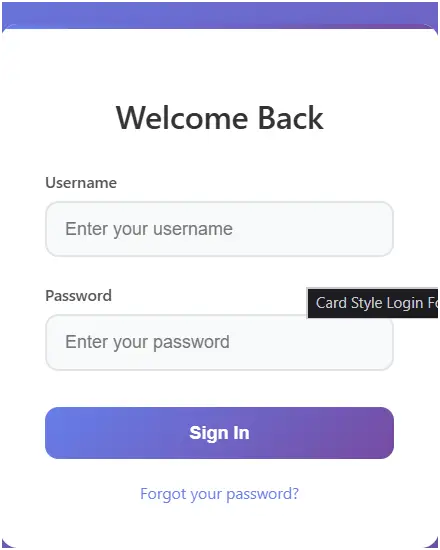
This code creates a modern and stylish card-based login form using HTML, CSS, and JavaScript. The form is designed with a sleek gradient background, shadow effects, and responsive design, making it suitable for both desktop and mobile screens. It demonstrates how to build a functional and visually appealing login system for web applications.
Features of the Code
- Card Design UI – The login form is displayed inside a card with rounded corners, shadows, and a gradient header effect.
- Responsive Layout – The form adapts to smaller screens with adjusted padding and spacing.
- Form Validation – A simple validation system checks if the username and password are correct before granting access.
- Error Handling – If incorrect credentials are entered, a styled error message is displayed.
- Interactive Inputs – Input fields change style on focus (highlighted border and shadow).
- Animated Button – The login button has hover and click animations for a smooth user experience.
- Forgot Password Option – A clickable link is included for password recovery navigation.
- Enter Key Support – Users can press the Enter key to log in without clicking the button.
- Security Placeholder (Demo) – Uses JavaScript to simulate authentication (in real systems, backend validation would be used).
How It Works
- HTML Structure
- Defines the login card (
.login-card) containing a form with username and password fields. - Includes a login button, error message section, and a "Forgot Password" link.
- Defines the login card (
- CSS Styling
- Creates a gradient background with a centered form.
- Adds card effects like rounded corners, drop shadows, and gradient top borders.
- Enhances input fields and buttons with hover, focus, and transition effects.
- Makes the form mobile-friendly with a media query.
- JavaScript Functionality
- Form Submission Handling: Prevents the default form submission and runs
handleLogin(). - Login Validation: Checks if the username is
"admin"and the password is"password123".- If correct → shows a success alert.
- If incorrect → displays the error message.
- Keyboard Support: Allows pressing Enter to trigger the login process when focused on input fields.
- Form Submission Handling: Prevents the default form submission and runs
Conclusion
This login form provides a professional-looking and functional authentication interface that combines modern design with basic client-side validation. While it demonstrates the front-end functionality of a login system, in real-world applications it should be connected to a secure backend server and database for proper authentication. Overall, it’s a great example of combining UI design and interactive JavaScript logic in a compact and user-friendly login card.
<artifact identifier="card-login-form" type="text/html" title="Card Style Login Form">
<!DOCTYPE html>
<html lang="en">
<head>
<meta charset="UTF-8">
<meta name="viewport" content="width=device-width, initial-scale=1.0">
<title>Card Style Login Form</title>
<style>
body {
font-family: 'Segoe UI', Tahoma, Geneva, Verdana, sans-serif;
display: flex;
justify-content: center;
align-items: center;
min-height: 100vh;
margin: 0;
background: linear-gradient(135deg, #667eea 0%, #764ba2 100%);
padding: 20px;
box-sizing: border-box;
}
.login-card {
background: white;
border-radius: 16px;
box-shadow: 0 20px 40px rgba(0, 0, 0, 0.1), 0 1px 3px rgba(0, 0, 0, 0.05);
padding: 40px;
width: 100%;
max-width: 400px;
backdrop-filter: blur(10px);
position: relative;
overflow: hidden;
}
.login-card::before {
content: '';
position: absolute;
top: 0;
left: 0;
right: 0;
height: 4px;
background: linear-gradient(90deg, #667eea, #764ba2);
}
.login-card h2 {
text-align: center;
margin-bottom: 30px;
color: #333;
font-size: 28px;
font-weight: 600;
}
.form-group {
margin-bottom: 24px;
position: relative;
}
.form-group label {
display: block;
margin-bottom: 8px;
color: #555;
font-weight: 500;
font-size: 14px;
}
.form-group input {
width: 100%;
padding: 14px 16px;
border: 2px solid #e1e5e9;
border-radius: 12px;
font-size: 16px;
transition: all 0.3s ease;
box-sizing: border-box;
background: #f8f9fa;
}
.form-group input:focus {
outline: none;
border-color: #667eea;
background: white;
box-shadow: 0 0 0 3px rgba(102, 126, 234, 0.1);
}
.login-button {
width: 100%;
padding: 14px;
background: linear-gradient(135deg, #667eea 0%, #764ba2 100%);
color: white;
border: none;
border-radius: 12px;
font-size: 16px;
font-weight: 600;
cursor: pointer;
transition: all 0.3s ease;
margin-top: 8px;
}
.login-button:hover {
transform: translateY(-2px);
box-shadow: 0 10px 25px rgba(102, 126, 234, 0.3);
}
.login-button:active {
transform: translateY(0);
}
.error {
color: #e74c3c;
font-size: 14px;
text-align: center;
margin-top: 16px;
display: none;
padding: 10px;
background: #fdf2f2;
border-radius: 8px;
border: 1px solid #e74c3c;
}
.forgot-password {
text-align: center;
margin-top: 20px;
}
.forgot-password a {
color: #667eea;
text-decoration: none;
font-size: 14px;
}
.forgot-password a:hover {
text-decoration: underline;
}
@media (max-width: 480px) {
.login-card {
padding: 30px 24px;
margin: 10px;
}
}
</style>
</head>
<body>
<div class="login-card">
<h2>Welcome Back</h2>
<form id="loginForm">
<div class="form-group">
<label for="username">Username</label>
<input type="text" id="username" placeholder="Enter your username" required>
</div>
<div class="form-group">
<label for="password">Password</label>
<input type="password" id="password" placeholder="Enter your password" required>
</div>
<button type="submit" class="login-button">Sign In</button>
<div class="error" id="error-message">Invalid username or password. Please try again.</div>
</form>
<div class="forgot-password">
<a href="#">Forgot your password?</a>
</div>
</div>
<script>
document.getElementById('loginForm').addEventListener('submit', function(e) {
e.preventDefault();
handleLogin();
});
function handleLogin() {
const username = document.getElementById('username').value.trim();
const password = document.getElementById('password').value;
const errorMessage = document.getElementById('error-message');
// Simple demo validation
if (username === "admin" && password === "password123") {
alert("Login successful! Welcome to the dashboard.");
errorMessage.style.display = 'none';
// In a real app, redirect to dashboard
// window.location.href = 'dashboard.html';
} else {
errorMessage.style.display = 'block';
document.getElementById('password').focus();
}
}
// Add enter key support
document.addEventListener('keypress', function(e) {
if (e.key === 'Enter') {
const activeElement = document.activeElement;
if (activeElement.tagName === 'INPUT') {
handleLogin();
}
}
});
</script>
</body>
</html>
</artifact>
Modern HTML Login Forms – Overlay, Card Designs & UI Styles (Related to HTML Forms)
Gradient Overlay Fullscreen Login Form:
This login form uses gradient overlays across the full screen to create a colorful and modern background. It improves visual appeal while keeping the login section clear and focused.
Read more: https://macronepal.com/blog/gradient-overlay-fullscreen-overlay-login-form/
Animated Fade-In Overlay Login Form:
This form uses smooth fade-in animations when the page loads. It enhances user experience by making the login interface feel dynamic and interactive.
Read more: https://macronepal.com/blog/animated-fade-in-overlay-fullscreen-overlay-login-form/
Light Glass Look Fullscreen Login Form:
A soft glass-style UI with light transparency and blur effects. It creates a clean, elegant login interface with a modern aesthetic.
Read more: https://macronepal.com/blog/light-glass-look-fullscreen-overlay-login-form/
Dark Blur Overlay Fullscreen Login Form:
This design uses a dark blurred background overlay, helping the login form stand out while giving a professional and modern dark UI feel.
Read more: https://macronepal.com/blog/dark-blur-overlay-fullscreen-overlay-login-form/
Floating Card Login Form (HTML, CSS, JS):
A floating card-style login form that appears elevated above the background using shadows and positioning effects for a 3D-like look.
Read more: https://macronepal.com/aws/floating-card-login-form-in-html-css-and-javascript/
Gradient Card Login Form (HTML, CSS, JS):
This login form uses gradient backgrounds inside a card layout, making the interface visually attractive and modern.
Read more: https://macronepal.com/blog/gradient-card-login-form-in-html-css-and-javascript/
Image Background Card Login Form (HTML, CSS, JS):
A card-style login form placed over an image background, combining visual storytelling with functional login design.
Read more: https://macronepal.com/blog/image-background-card-login-form-in-html-css-and-javascript/
Split Card Login Form (HTML, CSS, JS):
This design splits the login card into two sections, often with an image on one side and form fields on the other, creating a balanced layout.
Read more: https://macronepal.com/aws/split-card-login-form-in-html-css-and-javascript/
Glow Neon Card Login Form (HTML, CSS, JS):
A futuristic login form using neon glow effects around the card, giving it a cyber-style appearance suitable for modern UI themes.
Read more: https://macronepal.com/blog/glow-neon-card-login-form-in-html-css-and-javascript/
Neumorphic Card Login Form (HTML, CSS, JS):
This design uses soft shadows and highlights to create a realistic 3D “pressed” effect, known as neumorphism.
Read more: https://macronepal.com/blog/neumorphic-card-login-form-in-html-css-and-javascript/
Glassmorphic Card Login Form (HTML, CSS, JS):
A glass-like transparent card design with blur effects, widely used in modern web UI for clean and elegant interfaces.
Read more: https://macronepal.com/blog/glassmorphic-card-login-form-in-html-css-and-javascript/
Simple Card Style Login Form (HTML, CSS, JS):
A basic card-based login form with minimal design, focusing on usability and clean layout without extra effects.
Read more: https://macronepal.com/blog/simple-card-style-login-form-in-html-css-and-javascript/
Simple Login Form (HTML, CSS, JS):
A straightforward login form with essential fields like username and password, built using basic HTML, CSS, and JavaScript for easy implementation.
Read more: https://macronepal.com/blog/simple-login-form-in-html-css-and-javascript/